

The localForage is an open-source JavaScript library that refines the experience of saving data to web browser databases like localStorage, IndexedDB or WebSQL API.
It supports the majority of all types of browser databases.
It is absolutely asynchronous that simply uses browser databases and improves the universal offline experience of the web app.
In this tutorial, we’ll see how to save data to browsers in a much easier way with localforage setItem() method.
Localforage setItem() method
- With
localforagesetItem(), developers are allowed to store multiple types of data not just strings. - It automatically manages and loads the best web browser driver(
IndexedDB,WebSQL, andlocalStoragedrivers). - It also supports to store blob and arbitrary type of data, so that we can store images, files, etc.
- It also supports
ES6 Promises.
Syntax
setItem(key, value, successCallback);Types of supported JavaScript objects
- Array
- ArrayBuffer
- Blob
- Float32Array
- Float64Array
- Int8Array
- Int16Array
- Int32Array
- Number
- Object
- Uint8Array
- Uint8ClampedArray
- Uint16Array
- Uint32Array
- String
Example
const user = {
firstName: "Sunidhi",
lastName: "Chauhan",
profession: "Singer 🎤",
};
localforage
.setItem("userDetails", user)
.then((value) => {
console.log("👩🎤 " + value.firstName + " " + value.lastName);
})
.catch((error) => {
console.error(error);
});Output in console
👩🎤 Sunidhi Chauhan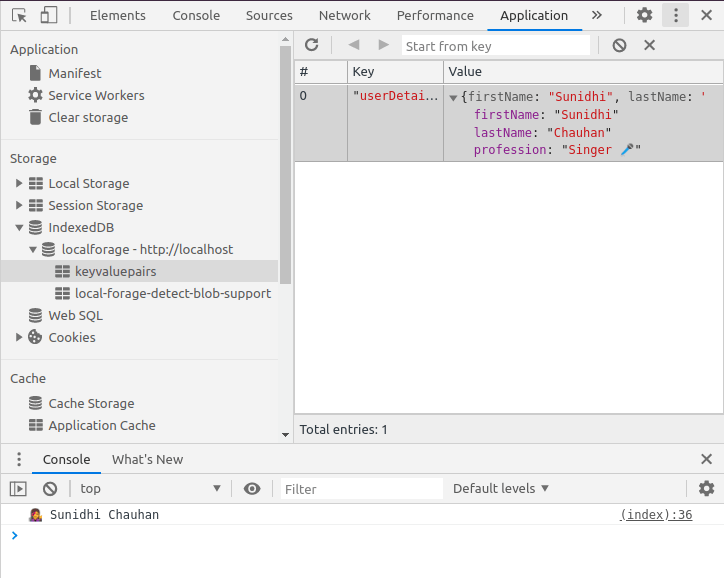
Screenshot for localforage setItem() example
Multiple instances
The localforage also allows developers to create multiple instances using createInstance() method, pointing to different stores.
var asianCountries = localforage.createInstance({
  countries: ["India 🇮🇳", "Singapore 🇸🇬", "Israel 🇮🇱", "Japan 🇯🇵"],
});

var europeanCountries = localforage.createInstance({
  countries: ["Italy 🇮🇹", "France 🇫🇷", "Switzerland 🇨🇭", "Sweden 🇸🇪"],
});

// Setting the key on one of these doesn't affect the other.
asianCountries.setItem("asianLanguages", [
  "Hindi",
  "English",
  "Gujarati",
  "Japanese",
  "Hebrew",
]);

europeanCountries.setItem("europeanLanguages", [
  "Italian",
  "English",
  "Romansh",
  "Finnish",
]);
Hope you like this
Happy 😄 coding
With ❤️ from India 🇮🇳
