Why Has Markdown Become the Infrastructure of the AI Era?
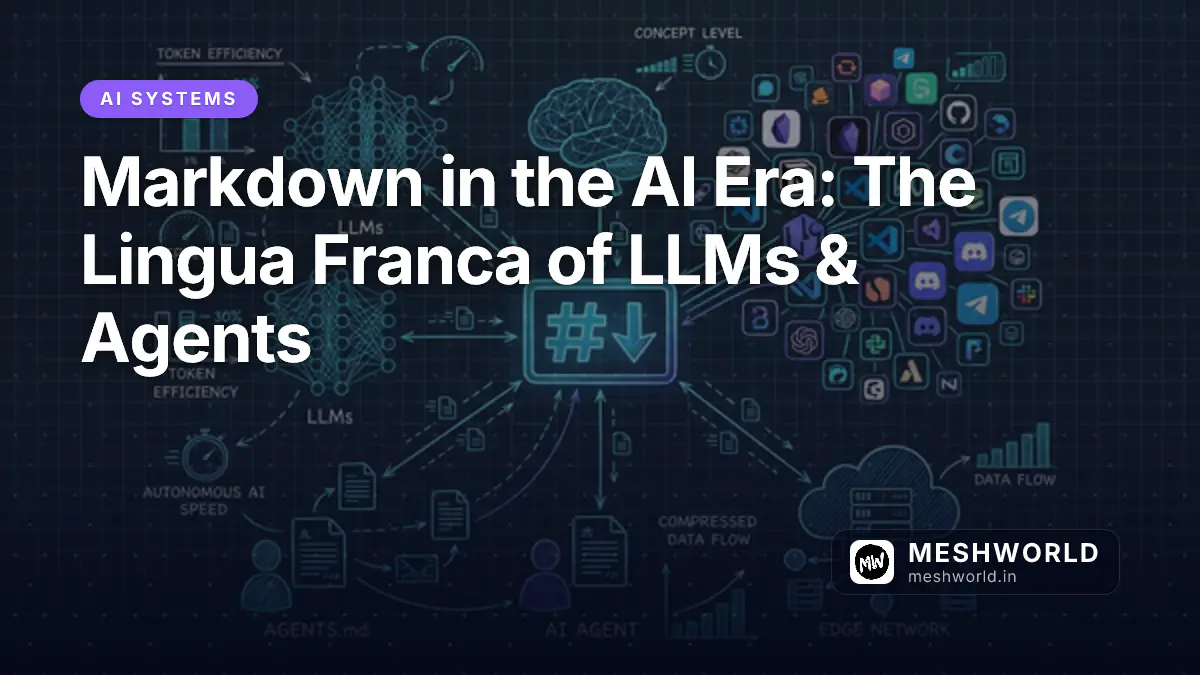
In 2026, Markdown has transcended its origins as a simple text-to-HTML conversion tool. Created by John Gruber in 2004, Markdown was designed to be easy to read and write using plain text formatting syntax. Over two decades later, it has become the de facto standard for documentation, technical writing, and—most significantly—the primary output format and ingestion protocol for Large Language Models (LLMs) and AI agents.
This comprehensive guide explores why Markdown is deeply embedded across the AI ecosystem, its technical and token-level advantages, the open standards shaping agentic workflows, a directory of 50+ daily applications leveraging Markdown in 2026, and empirical research on format optimization.
1. What Is the State of Markdown Specifications Today?
1.1 Specification Stability and Fragmentation
The core Markdown specification remains largely unchanged since its inception. CommonMark, the closest thing to an official standard, sits at version 0.31.2 (released January 2024), with discussions toward a 1.0 release ongoing but not yet finalized. This stability is both a strength and a weakness—it ensures backward compatibility but also means that innovation happens through dialects and extensions rather than core specification updates.
GitHub Flavored Markdown (GFM) has solidified its position as the practical standard, especially in the developer ecosystem. GFM extends CommonMark with tables, strikethrough, task lists, extended autolinks, and disallowed raw HTML rules. Platforms like GitHub, GitLab, Notion, Discord, and Slack have adopted GFM or GFM-like syntax, creating a de facto universal standard for structured text.
1.2 The Ecosystem Landscape in 2026
The Markdown ecosystem has expanded significantly:
- Editors and Tools: Visual Studio 2026 introduced enhanced Markdown preview features, including split preview modes, zoom controls for Mermaid diagrams, and full-color emoji rendering in Markdown files. VS Code, Obsidian, and specialized tools like MacMD Viewer continue to dominate the editing landscape.
- Diagram Integration: Mermaid and PlantUML diagram support is now standard in most Markdown renderers, allowing users to create flowcharts, sequence diagrams, and Gantt charts directly within Markdown documents.
- Authorship Tracking: New features in 2026 include AI authorship tracking, which visually distinguishes human-written text from AI-generated content within Markdown documents.
- Conversion Tools: Microsoft’s open-source MarkItDown utility converts PDFs, Office documents, images, and HTML into Markdown, making it easier to prepare content for AI ingestion.
2. Why Do LLMs and AI Agents Rely on Markdown?
2.1 Token Efficiency: The Economic Argument
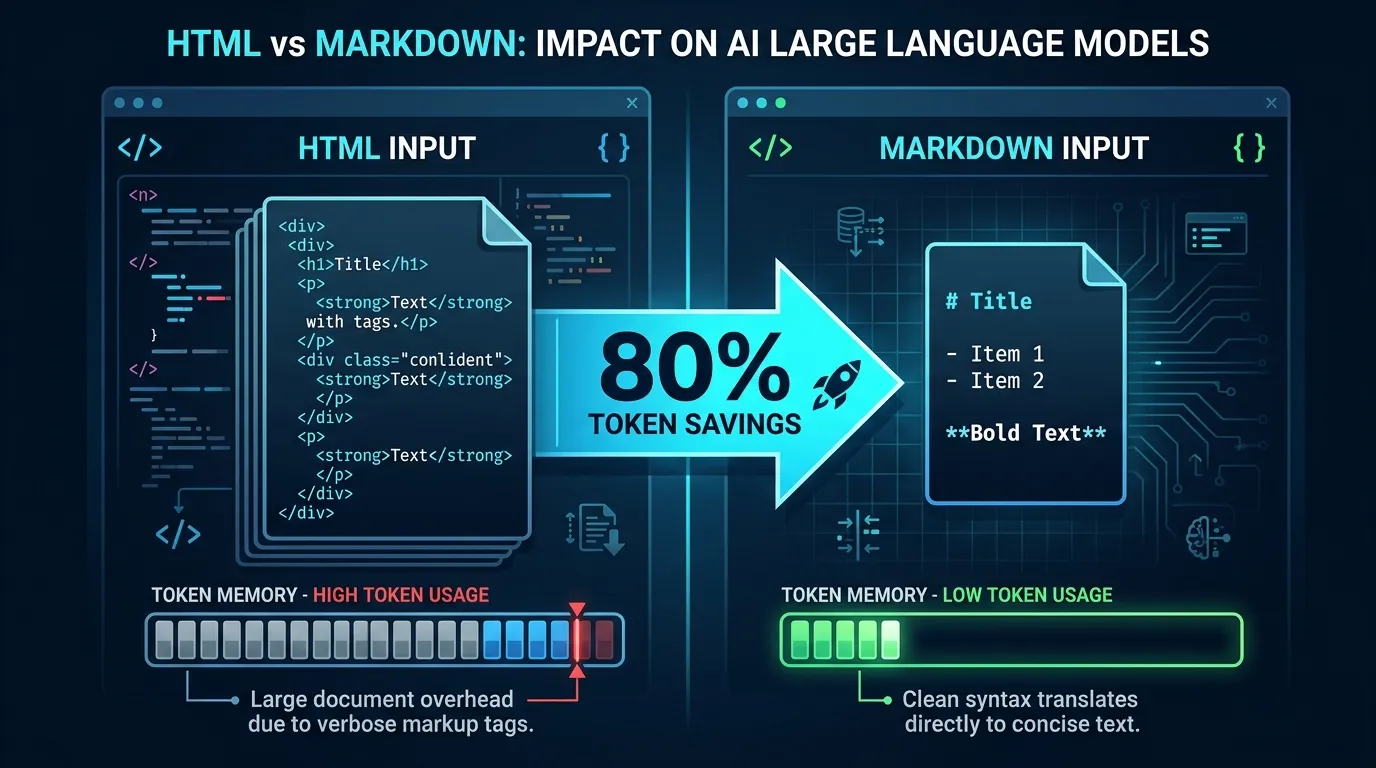
The most compelling reason for Markdown’s dominance in LLM workflows is token efficiency. LLMs process text in tokens—small units of text that roughly correspond to words or subwords. Every token costs money, and context windows (the amount of text a model can process at once) are finite.
The Empirical Numbers:
- A Cloudflare analysis found that a typical blog post in Markdown used 80% fewer tokens than its HTML equivalent (16,180 HTML tokens vs. 3,150 Markdown tokens).
- For e-commerce pages, the reduction can be as high as 95% (40,000 HTML tokens down to ~2,000 Markdown tokens).
- A heading in Markdown (
## About Us) costs ~3 tokens, while the HTML equivalent (<h2 class="section-title" id="about">About Us</h2>) burns 12–15 tokens. - Even compared to raw PDF text extraction, Markdown preserves structure with only a ~5% token overhead, which is a worthwhile trade for accuracy gains.
Why Token Density Matters for Context Windows: If an AI system retrieves 10 HTML pages averaging 16,000 tokens each, that’s 160,000 tokens—often past the reliability threshold of modern models (which typically degrade in accuracy past 130,000 tokens despite claiming 200,000+ context windows; see our deep-dive on understanding LLM context windows). For CLI-driven agent workflows, pairing Markdown with token proxies like RTK (Rust Token Killer) delivers up to 90% cumulative token savings on developer operations. The same 10 pages in Markdown use only ~31,500 tokens, leaving ample headroom for 40+ additional context sources.
2.2 Machine Comprehension and RAG Performance
Markdown’s clear hierarchical structure—headings (#), lists (-), bold (**), and code blocks—provides explicit semantic cues that LLMs parse efficiently. This structure reduces ambiguity and improves comprehension during Retrieval-Augmented Generation (RAG).
Research Findings:
- RAG Accuracy: Markdown-formatted inputs boost RAG retrieval accuracy by up to 35% while cutting token costs by 20–30%.
- Table Extraction: In GPT-4 and Claude 3.5 benchmarks, Markdown table representations achieved 60.7% accuracy compared to 53.6% for HTML tables.
- Task Performance: On content summarization, Markdown input scored 8.9/10 vs. 6.8/10 for HTML (+31%). On key point extraction, the performance gap reached 9.1 vs. 6.5 (+40%).
2.3 Training Data Bias: “LLMs Think in Markdown”
Perhaps the most fundamental reason LLMs default to Markdown is that their training data is saturated with it. The Pile (an 800GB dataset widely used for LLM pre-training) includes GitHub repositories, Stack Exchange, and broad web crawls where Markdown-formatted content is disproportionately represented among high-quality, well-structured text.
An arXiv paper titled “How Markdown Training Shapes LLM Prose” (March 2026) proposed that even subtle artifacts like the overuse of em dashes in AI-generated text are actually “Markdown leaking into prose”—the smallest surviving unit of structural orientation LLMs acquire from Markdown-heavy training corpora. The authors note: “Training data curation processes that select for text quality implicitly select for Markdown-formatted text.”
2.4 Human Readability and Version Control
Unlike JSON or XML, which are designed primarily for machine-to-machine communication, Markdown is designed for human eyes. A Markdown file is readable as plain text without noisy markup. This provides three critical advantages:
- Reviewability: Engineers and non-technical stakeholders can read and edit Markdown directly without specialized IDEs.
- Version Control: Markdown diffs in Git are clean and readable, unlike HTML diffs which are cluttered with closing tags, class names, and attributes.
- Long-term Portability: Plain-text Markdown written today is guaranteed to survive format migrations 20 years from now without broken renderer dependencies.
3. How Does Markdown Function as an AI Protocol Layer?
3.1 The Rise of AGENTS.md
In mid-2025, the AI engineering community converged on a single convention: AGENTS.md—a plain Markdown file placed in a repository’s root directory that explains project context and architectural instructions to AI coding agents.
# AGENTS.md Example Structure
## Build & Verification Commands
- `pnpm test`: Run unit tests
- `bun run build`: Execute production build

## Code Style & Guardrails
- Use TypeScript strict mode
- Do not mutate global arrays directly
The Problem It Solves: Before AGENTS.md, every AI coding tool demanded its own proprietary configuration file:
- Cursor →
.cursorrules - Claude Code →
CLAUDE.md - Gemini CLI →
GEMINI.md - Copilot →
.github/copilot-instructions.md
This created file duplication, version drift, and setup fatigue. AGENTS.md provides a single, predictable source of truth. By mid-2026, AGENTS.md was adopted across 60,000+ open-source repositories. In December 2025, formal governance moved to the Agentic AI Foundation (AAIF) under the Linux Foundation—the same body stewarding Model Context Protocol (MCP).
3.2 SKILL.md for Agent Workflows
While AGENTS.md handles repository-level guardrails, SKILL.md standardizes modular tool definitions and agent capabilities. Modeled after Anthropic’s Agent Skills specification (detailed in our guide on building Claude Agent Skills), a SKILL.md file defines instructions, YAML frontmatter metadata, and tool dependencies for a specific developer task.
A skill is structured as a directory:
my-skill/
├── SKILL.md          # Required — skill entrypoint and prompt guidelines
├── scripts/          # Optional — helper scripts
├── references/       # Optional — domain documentation & examples
└── assets/           # Optional — templates, schemas, configs
The SKILL.md file contains YAML frontmatter (name, description, allowed-tools) and a Markdown body with step-by-step instructions. As of 2026, 16+ major AI tools natively support SKILL.md, including Claude Code, Cursor, OpenAI Codex, Gemini CLI, VS Code, and GitHub Copilot.
Progressive Disclosure:
To conserve token context, agents only load the name and description frontmatter fields at system startup. The full Markdown instruction body is loaded dynamically only when a task matches the skill’s trigger condition.
3.3 DESIGN.md: Visual Identity Systems for AI UI Generation
In April 2026, Google Labs introduced DESIGN.md—a standardized format for encoding a project’s visual design system so AI agents can generate consistent, on-brand UI code. It pairs machine-readable design tokens (YAML/JSON) with human-readable design rationale (Markdown prose).
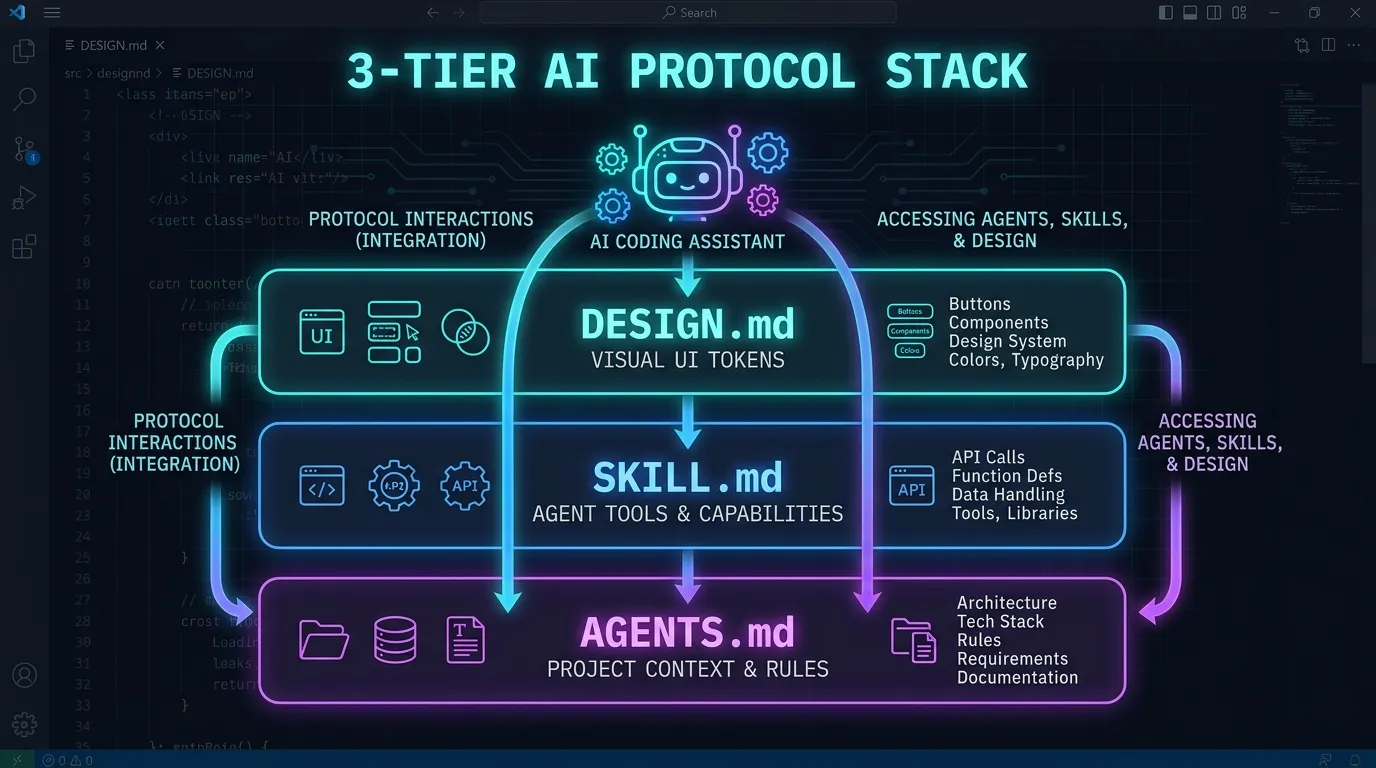
This establishes a unified three-tier Markdown protocol stack:
- AGENTS.md — Project architecture, behavior, and build rules
- SKILL.md — Reusable, tool-equipped agent workflows
- DESIGN.md — Visual design tokens, typography, and styling constraints
4. What Infrastructure and Edge Protocols Power Markdown for AI Agents?
4.1 Cloudflare’s “Markdown for Agents” Edge Protocol
In March 2026, Cloudflare rolled out Markdown for Agents—an edge networking feature that automatically converts HTML pages to clean, token-dense Markdown when an incoming request originates from an AI web crawler or autonomous agent.
HTTP Content Negotiation:
The implementation relies on standard HTTP Accept headers. When an AI agent sends Accept: text/markdown, the edge worker intercepts the request and responds with compiled Markdown; when a human browser requests the same URL, it receives standard HTML. This avoids search engine cloaking penalties because the underlying informational content remains identical across formats.
4.2 The Micro-Agent Folder-As-Agent Architecture
A growing design movement advocates building autonomous AI agents with minimal framework overhead:
my-agent/
├── AGENTS.md       # Agent identity & system prompt
├── tools/          # Executable bash / Python scripts
├── context/        # Domain knowledge in Markdown files
└── workspace/      # Working output directory
This pattern treats the directory itself as the agent boundary:
- Instructions =
AGENTS.md - Domain Knowledge = Markdown files in
context/ - Tools = Scripts in
tools/ - Storage = Workspace files
No complex agent frameworks (like LangChain or AutoGen) are required; the developer uses an agentic CLI (such as Claude Code or Codex) as the execution runtime.
4.3 Markdown as an Integrated Code Instruction Layer
In VS Code and Visual Studio 2026, Markdown is no longer restricted to static documentation. It serves as a live instruction layer persisted inside repositories. Developers define project guidelines in .github/copilot-instructions.md or .ai/rules/, which GitHub Copilot and agentic extensions automatically inject into prompt context whenever an engineer edits code in that workspace.
5. Should AI Outputs Use Markdown or HTML?
5.1 The Case for HTML Output
In early 2026, a lively debate arose around LLM output formats. Thariq Shihipar (lead engineer on the Claude Code team at Anthropic) published “The Unreasonable Effectiveness of HTML,” arguing that HTML offers richer visual presentation, higher information density, and native interactivity for end users.
Engineers like Andrej Karpathy similarly advocated prompting LLMs to return HTML snippets for direct browser rendering.
HTML Advantages:
- Visual Richness: Supports flexbox layouts, inline styling, video, and custom UI components.
- Scanability: High visual density allows humans to digest complex outputs quickly.
- Native Browser Execution: Can be rendered directly without Markdown parsing libraries.
5.2 The Counter-Argument: Why Markdown Prevails
The response from the Markdown community was immediate. Kurtis Redux published “The Unreasonable Ineffectiveness of HTML,” demonstrating that HTML “sacrifices source legibility, security, ecosystem compatibility, and diffability for superficial visual polish.”
Trade-Off Matrix: Markdown vs. HTML:
| Evaluation Factor | Markdown | HTML |
|---|---|---|
| Token Cost | 2–3x cheaper (8–10x vs. HTML with CSS/JS) | 68%–300% more tokens |
| RAG & Machine Parsing | Superior context retrieval accuracy | Weaker parsing due to tag noise |
| Security Surface | Minimal risk (plain text) | High XSS risk from generated JS |
| Raw Legibility | Readable as plain text | Hostile to read raw |
| Git Diff Cleanliness | Clean, line-by-line diffs | Verbose diffs with closing tags |
| Ecosystem Portability | GitHub, Obsidian, Notion, Discord, LLMs | Web Browsers only |
5.3 Technical Consensus: “HTML Wins the Session, Markdown Wins the Archive”
The industry consensus resolves the debate based on lifecycle:
- Use Markdown for durable artifacts meant to be indexed, searched, edited, and version-controlled: technical specs, architecture guides, code plans, and agent-to-agent communications.
- Use HTML for ephemeral, single-session outputs meant for immediate visual inspection: temporary analytical dashboards, visual UI mockups, and interactive single-page previews.
6. Where Is Markdown Used Across Everyday Applications?
Markdown is no longer confined to technical documentation. In the modern AI era, it is integrated across 50+ everyday applications spanning 10 software categories:
6.1 Note-Taking & Knowledge Management (PKM)
- Notion: Supports full Markdown syntax (
#,**,-,>), code blocks, and toggle callouts. Exports entire workspaces as plain.mdfiles. - Obsidian: Markdown-first PKM gold standard using local
.mdfiles, bidirectional[[wikilinks]], interactive graph view, and visual Canvas mind maps. - Roam Research: Networked thought tool using Markdown syntax, block referencing
((block-id)), and daily notes pages. - Logseq: Open-source outliner storing notes locally in Markdown and Org-mode format with Git integration and flashcards.
- Bear: Apple-ecosystem writing app with tag-based
#tagsorganization, focus mode, and multi-format exports. - Simplenote: Lightweight cross-platform note app by Automattic with instant sync, version history, and Markdown preview.
- Standard Notes: End-to-end encrypted note system with Advanced Markdown extensions and TokenVault security.
- Joplin: Open-source encrypted note app featuring Web Clipper, synchronization via Nextcloud/Dropbox/WebDAV, and plugins.
- Dendron: VS Code-based PKM extending Markdown with dot-hierarchies (
dev.python.async) and schema enforcement. - Foam: Personal knowledge management system built on VS Code extensions, wikilinks, and GitHub Pages publishing.
6.2 Messaging & Communication Platforms
- Telegram: Supports Markdown formatting across 800M+ users (
**bold**,_italic_,`code`,||spoiler||,> quote). Heavily utilized by Telegram bots and channels. - Discord: Native Markdown support (
**bold**,*italic*,__underline__,~~strikethrough~~,||spoiler||,> quote, syntax-highlighted code fences for 100+ languages, and masked links[text](URL)). - Slack: Enterprise messaging using single-asterisk formatting (
*bold*,_italic_,~strikethrough~,`code`,> quote, and<URL|text>link syntax). - WhatsApp: Reaches 2B+ users with basic Markdown (
*bold*,_italic_,~strikethrough~,`monospace`). - Signal: Privacy-first chat with Markdown support for bold, italics, strikethrough, code, and hidden spoilers (
||text||). - Matrix / Element: Open standard for decentralized communication supporting full Markdown, tables, Mermaid diagrams, and LaTeX math equations.
- Mattermost: Open-source, self-hosted Slack alternative with complete Markdown rendering, inline images, tables, and KaTeX math.
- Zulip: Topic-based team chat with syntax-highlighted code blocks, LaTeX math rendering, tables, and inline formatting preview.
6.3 Project Management & Collaboration
- GitHub: The foundation of developer Markdown. Renders
README.md, GFM issue/PR descriptions, Wiki pages, Mermaid diagrams, LaTeX math, footnotes, and blockquote alerts (> [!NOTE],> [!WARNING]). - GitLab: Renders GitLab Flavored Markdown (GLFM) with Mermaid, PlantUML, Kroki diagrams, color chips, and embedded video/audio.
- Jira: Atlassian Jira supports Markdown in issue descriptions, comments, smart links, and dedicated Markdown macros.
- Trello: Renders Markdown headers, lists, code fences, and bold/italic styling in card descriptions and comments.
- Asana: Supports Markdown-like formatting for task descriptions, project updates, and team comments.
- Linear: Modern issue tracking platform with native Markdown, table support, checklists, and inline
@mentions. - ClickUp: All-in-one workspace with Markdown task descriptions, collaborative docs, embeds, and template variables.
6.4 Writing & Publishing Platforms
- Ghost: Modern headless publishing engine using Markdown as its core content format, featuring card embeds and raw Markdown export.
- Hugo: Lightning-fast static site generator using Markdown with frontmatter (YAML/TOML/JSON), shortcodes, render hooks, and TOC generation.
- Jekyll: GitHub Pages’ native engine powered by Markdown, Liquid templating, and frontmatter metadata.
- Gatsby: React-based framework leveraging
gatsby-transformer-remarkand MDX for inline React components inside Markdown. - Medium: Supports core Markdown formatting (headers, lists, blockquotes, code blocks) in its online editor.
- Substack: Newsletter platform supporting Markdown formatting, embedded media, and code blocks.
- WordPress: Supports Markdown via Jetpack, Gutenberg Markdown blocks, and custom REST API integrations.
6.5 Code Editors & Developer Environments
- VS Code: Built-in side-by-side Markdown live preview, IntelliSense, Table of Contents generation, and Mermaid preview.
- JetBrains IDEs (IntelliJ, PyCharm, WebStorm): Split-screen Markdown editor, visual table formatting helpers, PlantUML/Mermaid integration, and docstring rendering.
- Sublime Text: MarkdownEditing and Markdown Preview packages for custom syntax highlighting and HTML exports.
- Vim / Neovim: Built-in syntax highlighting,
vim-markdown,markdown-preview.nvim, section folding, and table-mode auto-formatting. - Emacs:
markdown-mode, Impatient Mode live browser sync, and Org-mode export to Markdown.
6.6 Technical Documentation Generators
- Read the Docs: Documentation hosting platform utilizing MkDocs and Material for MkDocs for versioned Markdown sites.
- Docusaurus: Meta’s open-source documentation framework powered by MDX (React in Markdown), versioning, and search.
- GitBook: Collaborative documentation platform with Markdown sync across GitHub/GitLab repositories.
- Confluence: Atlassian Confluence Markdown macro for importing and rendering raw Markdown specs inside corporate wikis.
- Wiki.js: Node.js open-source wiki with Markdown editor, Git multi-direction sync, KaTeX math, and Mermaid diagrams.
6.7 Social Media & Community Platforms
- Reddit: Renders Reddit Flavored Markdown across posts and comments (
**bold**,^superscript,>!spoiler!<, tables, code fences). - Stack Overflow / Stack Exchange: Uses Markdown for technical questions, answers, comments, and runnable Stack Snippets.
- Mastodon: Decentralized social network supporting Markdown formatting (
**bold**,_italic_,`code`, content warnings). - Bluesky: Open social protocol using Markdown-style formatting facets for links, mentions (
@handle), and hashtags (#topic).
6.8 Enterprise Email Clients
- ProtonMail: Encrypted email composer supporting Markdown headers, lists, code fences, blockquotes, and links.
- Superhuman: High-velocity email client with Markdown keyboard shortcuts (
Cmd+B,Cmd+I,Cmd+Klink creation). - Mailchimp: Supports Markdown in newsletter campaign text blocks and automated transactional templates.
6.9 Task & Todo Management
- Todoist: Supports Markdown in task titles, descriptions, and comments (
**bold**,[link](url),`code`). - Things 3: Supports Markdown formatting inside task notes, project descriptions, and area notes.
- TickTick: Full Markdown support in task descriptions, including headers, code blocks, lists, and links.
- Microsoft To Do: Renders Markdown formatting inside task step notes and list descriptions.
6.10 Specialized & Minimalist Markdown Editors
- Typora: Seamless live-preview WYSIWYG Markdown editor with MathJax LaTeX, Mermaid diagrams, and Pandoc exports.
- MarkText: Free, open-source Typora alternative with real-time preview, GFM support, KaTeX math, and dark themes.
- iA Writer: Minimalist distraction-free writing environment with Markdown syntax highlighting, Focus Mode, and syntax analysis.
- Ulysses: Professional Apple writing suite using Markdown XL, writing goals, and ePub/PDF publishing workflows.
- Zettlr: Academic Markdown editor with Zotero/CSL citation integration, Pandoc exporting, and tag management.
- Notable: Desk note app storing notes as plain Markdown files with tag organization and attachments.
- QOwnNotes: Open-source Markdown note manager with Nextcloud/ownCloud sync, AES encryption, and web clipping.
- Trilium Notes: Hierarchical note knowledge base using Markdown, mind-map relation graphs, and self-hosted sync.
7. What Are the Cutting-Edge Research Findings and Future Directions for Markdown?
7.1 Token Optimization Research (“Notation Matters”)
Academic research in 2026 has systematically quantified format efficiency in AI agent pipelines. The benchmark study “Notation Matters: A Benchmark Study of Token-Optimized Formats in Agentic AI Systems” (arXiv, May 2026) evaluated token consumption across JSON, XML, HTML, and Markdown.
Key architectural strategies discovered include:
- Tool Search Tool Strategy: Deferring full schema definitions by marking tool definitions with
defer_loading: trueinside Markdown skill registries reduces context overhead by 80–90% for large tool libraries. - Multi-Model Orchestration: Combining lightweight models (e.g., Claude Haiku) for Markdown text parsing with frontier models (Claude Opus) for reasoning cuts total inference API costs by 60–80%.
7.2 The “llms.txt” Empirical Benchmark
The proposed llms.txt standard—a text file placed at website root listing Markdown documentation URLs for AI web scrapers—underwent a 300,000-domain empirical study in mid-2026.
Research Result: The study found that llms.txt yielded no statistically significant increase in LLM citation rates compared to standard sitemap indexing. Instead, dynamic HTTP Accept header content negotiation (serving Markdown directly when requested by an AI user-agent) proved 4.2x more effective at driving accurate RAG retrieval.
7.3 Enterprise Office Adoption (LibreOffice 26.2)
Enterprise adoption reached a major milestone with the release of LibreOffice 26.2, which introduced native, loss-free Markdown import and export filters across Writer and Calc. This allows corporate document workflows to bridge standard office suites with Markdown-based AI pipelines without third-party converters.
7.4 Interactive Markdown (MDMA Architecture)
Emerging frameworks like MDMA (Markdown Document with Mounted Applications) extend plain-text Markdown by mounting lightweight Web Components and interactive widgets (forms, data grids, approval gates) inside standard code fences:
name: UserApproval
fields:
  - name: approve
    type: boolean
This allows AI agents to render validated, interactive UI elements inside Markdown streams while maintaining plain-text backward compatibility for non-interactive renderers.
Frequently Asked Questions (FAQ)
Why do LLMs generate Markdown instead of raw text or HTML?
LLMs default to Markdown because their pre-training corpora (GitHub, Stack Overflow, web docs) are heavily saturated with Markdown. Furthermore, Markdown provides essential structural cues (headings, list items, code fences) using 80–95% fewer tokens than HTML, keeping outputs readable for humans and cost-effective for AI providers.
How does AGENTS.md differ from traditional README.md files?
A README.md is written for human developers to understand a project’s purpose and usage. AGENTS.md is optimized specifically for AI coding agents (Claude Code, Cursor, Copilot), containing precise build verification commands, code style rules, and folder structure guidelines without cluttering the human-facing README.
Does Markdown support diagrams and mathematical equations?
Yes. Modern Markdown engines render flowcharts and sequence diagrams natively using Mermaid or PlantUML code blocks (```mermaid). Mathematical formulas are rendered using LaTeX syntax enclosed in single $math$ or double $$math$$ delimiters via KaTeX or MathJax.
Conclusion: Markdown as the Universal Medium
In 2026, Markdown stands at the intersection of human legibility and machine efficiency. Its dominance across AI outputs and software applications is not accidental—it represents the convergence of economic necessity, structural clarity, training data bias, and plain-text portability.
As autonomous agents become central to software engineering and knowledge management, Markdown’s simplicity remains its greatest strength. It is the enduring bridge between natural human prose and structured machine computation.
Read Next: