

Claude Code Routines are cloud-hosted, autonomous AI agents that run 24/7 on Anthropic’s infrastructure. Introduced in research preview on April 13, 2026, Routines break the “terminal tether” by executing scheduled tasks without requiring your machine to be on. You configure a prompt, repository access, and connectors once, and the Routine fires automatically—whether you’re asleep, offline, or on vacation.
Imagine it’s Monday, 8:47 AM. You walk to your desk with a coffee, open your laptop, and before the lid is even fully up, three mission-critical reports are waiting in your inbox.
One is a Competitor Intelligence Digest, summarizing every blog post and pricing change your rivals made over the weekend. The next is an Automated Code Triage, with three draft Pull Requests already attempting to fix the top bugs in your backlog. The third is a Predictive Maintenance Report for a remote mining site, flagging a sensor regression that happened at 3 AM.
You didn’t open a single tab. You didn’t write a single prompt. And your laptop was asleep all night.
This is the power of Claude Code Routines.
What are Claude Code Routines?
The best way to think about a Routine is: “I’m hiring a brilliant virtual assistant who works the night shift.”
Technically, a Routine is a scheduled, cloud-hosted configuration of Claude Code. You package a prompt, a repository (or a set of web sources), and a group of MCP connectors once, and then set it to run on autopilot.
The Key Unlock: Server-Side Execution
Most automations (like Claude Cowork’s Scheduled Tasks) run locally. If your machine sleeps, they fail. Routines run on Anthropic’s infrastructure. They are hands-off. You could be on holiday in a different time zone, and the Routine will still fire, reasoning through tasks and delivering results exactly when you need them.
graph TD
    Trigger[Trigger: Time / API / Webhook] --> Cloud[Anthropic Cloud Infra]
    Cloud --> Agent[Fresh Claude Agent Session]
    Agent --> Tools[Accesses Repos, Web, MCP, Bash]
    Agent --> Reasoning[AI Reasons, Codes, & Acts]
    Reasoning --> Output[Slack / Email / PR / Sheets]
    Output --> Terminate[Session Ends]
How do Claude Code Routines work?
Routines are not just cron jobs; they are event-responsive agents. You can trigger them in three distinct ways:
- Scheduled Triggers: Run on a recurring cadence (hourly, nightly, or weekly).
- Example: Every night at 2 AM, pull the top bug from Linear, attempt a fix, and open a draft PR.
- API Triggers: Every routine gets its own authenticated HTTP endpoint and bearer token.
- Example: Connect Datadog to the endpoint. When an alert fires, Claude pulls the stack trace, correlates it with recent commits, and has a triage summary waiting before on-call arrives.
- GitHub Webhooks: Subscribe a routine to repository events like Pull Requests or releases.
- Example: On every PR opened, run a team-specific security checklist and leave inline comments before a human reviewer even looks.
How do Routines compare to other automation tools?
To understand the value of Routines, compare them to the tools you already use.
| Tool | Focus | Execution | AI Logic |
|---|---|---|---|
| Cron Jobs | Rigid Shell Scripts | Local/Server | None |
| n8n / Zapier | Workflow Nodes | Cloud | Limited / Node-based |
| Claude /loop | Repeating Session Tasks | Local (Session-bound) | High |
| Headless Mode | Programmatic CLI | Local/CI (User-managed) | High |
| Routines | Autonomous Cloud Agents | Anthropic Managed Cloud | Infinite (Reasoning) |
Routines vs. n8n
While n8n orchestrates predefined nodes, a Routine runs a full AI agent. It can make decisions, use tools, and handle situations that weren’t explicitly pre-programmed. It adapts to what it finds rather than following a rigid path.
Routines vs. Headless Mode
Headless mode removes the terminal UI but still runs on your infrastructure (like a GitHub Action). Routines are managed by Anthropic. Headless is for programmatic invocation you control; Routines are for hands-off, 24/7 execution.
Routines vs. /loop
The /loop command runs repeating tasks within an active session. It’s useful for iteration inside a working session—running tests repeatedly, polling for conditions, refining output. But /loop still requires an open session. It’s session-bound. If your connection drops or your machine sleeps, the loop stops. Routines don’t have this constraint—they’re entirely detached from any local process.
How do I set up a Claude Code Routine?
Setting up a Routine takes less than 5 minutes. Doing it well requires a specific mindset.
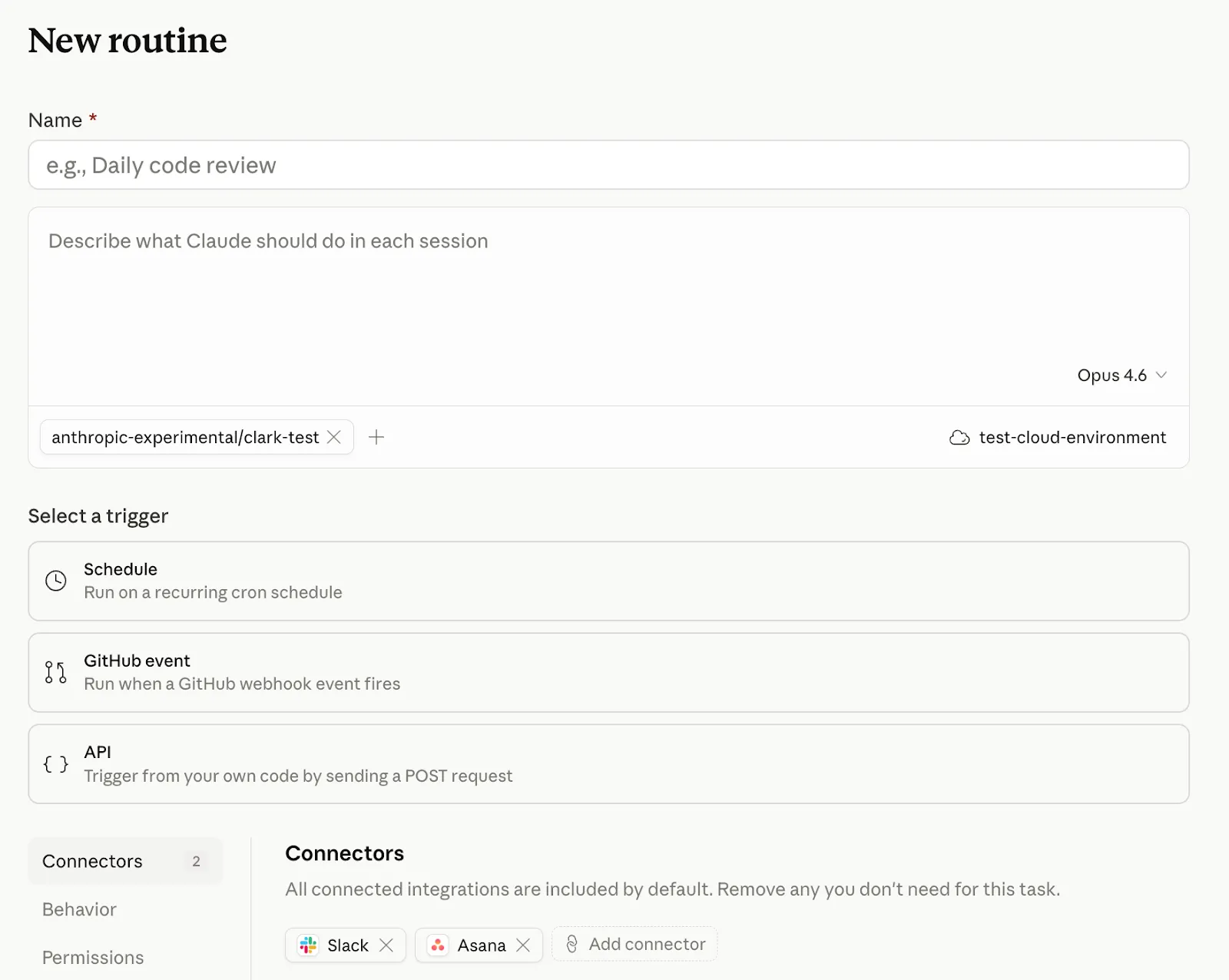
Step 1: Define the Task in CLAUDE.md
The prompt you write is the most important part. Because the routine runs without supervision, it must be self-contained and explicit. Vague instructions like “check for errors” produce inconsistent results. Instead, use: “Pull the last 24 hours of logs, summarize the top 5 errors by frequency, and write the report to /reports/daily-errors-YYYY-MM-DD.md.”
Step 2: Choose “Remote” Execution
In the Claude Code UI, you must select Remote, not Local. Local routines only fire when your machine is on. Remote routines run 24/7 in the cloud.
Step 3: Permissions & Tool Access
Be deliberate with tool grants. Common grants include:
- Bash: For running scripts and processing files.
- File System: For reading/writing to specific directories.
- Web Fetch: For pulling external data.
- Connectors: One-click authorization for Slack, Gmail, Linear, etc.
Step 4: The 2-Week “Shadow Mode”
Anthropic labels Routines as a research preview. I recommend running every new Routine in “shadow mode” for the first two weeks: let it execute, but review every output before forwarding it. Only once the output consistently matches your quality bar should you let it run unreviewed.
Pro tip: Keep a running Google Doc of your best one-off Claude prompts. When one proves consistently useful, promote it to a Routine in five minutes.
What can marketers do with Claude Code Routines?
While Routines were launched for developers, they might be an even bigger shift for marketers. Most marketing work is repeatable, time-boxed, and data-heavy. Here is how to automate your marketing week:
1. The Monday Morning Competitor Scan
- Trigger: Monday, 7:00 AM.
- Prompt: “Visit the blogs and LinkedIn pages of [Competitor A, B, C]. Summarize new content, pricing changes, or feature announcements into a 3-bullet point digest. Email it to me.”
- Why it matters: Move from reactive to proactive. Spot messaging shifts before your team does.
2. Daily Reddit Content Brief
- Trigger: Daily, 6:00 AM.
- Prompt: “Scan r/marketing and r/SaaS for the top 10 discussions. Identify the top 3 pain points today and suggest 3 LinkedIn post angles in my voice.”
- Why it matters: Never stare at a blank page again. Start your day with audience-led ideas.
3. Weekly SEO Sentinel
- Trigger: Friday, 4:00 PM.
- Prompt: “Check my Google ranking for [Keywords]. Compare against last week in [Google Sheet]. Flag any drop >3 positions and post a summary to #seo-alerts in Slack.”
4. Newsletter Curation Engine
- Trigger: Thursday, 2:00 PM.
- Prompt: “Scan [RSS Feeds/URLs] for the week’s top stories. Pick 5 and write 2-sentence teasers in a conversational tone. Save as a draft in Google Docs.”
5. Brand Voice Social Listening
- Trigger: Daily, 8:00 AM.
- Prompt: “Search Reddit and X for mentions of [My Brand]. Categorize sentiment and flag any negative threads immediately to Slack.”
6. Automated Performance Narrative
- Trigger: Monday, 8:00 AM.
- Prompt: “Pull data from the Marketing Dashboard. Flag metrics up/down >15%. Write a 250-word narrative summary of the week’s performance.”
7. Monthly Strategic Retrospective
- Trigger: 1st of every month.
- Prompt: “Analyze last month’s traffic and pipeline data. Write a 500-word retrospective on what worked, what didn’t, and top 3 priorities for next month.”
8. Documentation Drift Detection
- Trigger: Weekly.
- Prompt: “Scan all pull requests merged in the past 7 days. For each PR, identify any documentation files (README, docs/, wiki) that reference modified functions, APIs, or configuration options. If the documentation is outdated relative to the code changes, open a PR with suggested updates.”
- Why it matters: Docs go stale silently. A weekly routine catches drift before it becomes a support burden or causes user confusion.
How are Routines used in industrial applications?
Routines aren’t just for software and marketing. They are being deployed in high-stakes industries where 24/7 monitoring is non-negotiable.
🏥 Healthcare: Patient Triage & Lab Audits
A Routine can be set to run every hour, scanning incoming lab results from an EMR (Electronic Medical Record). If it detects an anomaly that exceeds a specific clinical threshold, it can cross-reference it with the patient’s history and send an urgent triage summary to the attending physician’s mobile app.
🚄 Railway & Infrastructure: Predictive Maintenance
In the railway industry, thousands of sensors monitor track heat and vibration. A Routine can ingest these logs via an API trigger, reason about “normal” vs “dangerous” vibration patterns using past failure data, and automatically schedule a maintenance crew if it detects a likely rail fracture before it happens.
✈️ Airports: Logistics & Delay Mitigation
Airports can use Webhook-triggered Routines to respond to weather changes. When a storm is detected, Claude can pull flight manifests, gate availability, and ground crew schedules to draft a revised logistics plan, then post it to the internal operations channel for human approval.
🛢️ Oil & Mining: Remote Safety Sentinel
For remote mining sites or oil rigs, Routines can monitor equipment health in the cloud. If a drill bit’s temperature spikes at 3 AM, Claude can pull the technical manual, diagnose the likely cause, and have a draft repair order waiting for the morning crew—all while the site manager is asleep.
What are advanced Claude Code Routines patterns?
For the technical power users, Routines unlock architecture that was previously impossible without a massive custom backend.
The Heartbeat Pattern
Claude has no memory between Routine runs. To solve this, use the Heartbeat Pattern:
- Run 1: Claude finishes a task and writes its current state to a
state.jsonfile in your repo. - Run 2: Claude starts by reading
state.json. It now “remembers” where it left off, allowing for continuous, multi-day reasoning.
This pattern is especially useful for building self-improving agents that adjust their behavior based on what they observed in previous runs. Over time, the agent accumulates context and becomes more effective at its task.
Multi-Agent Orchestration
A single Routine can spawn sub-agents in the cloud.
- Example: A “Global Market Analysis” routine. The coordinator agent spawns 5 sub-agents to research 5 different languages/regions simultaneously, then synthesizes the results into one report. Parallel execution, managed entirely by Anthropic. This builds on multi-agent systems architecture patterns.
How does governance work for Claude Code Routines?
The claude/ Prefix
To prevent accidents, Claude is restricted to pushing only to branches prefixed with claude/. This ensures routines don’t accidentally modify protected or long-lived branches.
Mitch Ashley on Governance
Mitch Ashley, VP at The Futurum Group, notes: “Claude Code Routines shift agent execution to Anthropic’s infrastructure… governance shifts from reviewing actions to constraining scope before runtime: repository access, connector selection, and branch rules.”
The Claude for Marketing Ecosystem
Routines are the final piece of the puzzle:
- Skills: Your processes.
- Cowork: Your files.
- Plugins: Specialist knowledge.
- Projects: Memory.
- Zapier/Apify: External actions/data.
- Routines: Your Time.
What are the limits and caveats of Claude Code Routines?
Usage Limits
Routines draw from your standard subscription usage. Additionally, there are daily run caps:
- Pro: 5 routines/day.
- Max: 15 routines/day.
- Team & Enterprise: 25 routines/day.
One-off runs don’t count against the daily cap. You can schedule a single future run (e.g., “tomorrow at 9am, summarize yesterday’s merged PRs”) and it consumes regular subscription usage instead. This is useful for reminders or follow-up tasks without burning your routine allowance.
The Caveats
- OAuth Tokens: Connectors can be temperamental. Tokens occasionally expire and need re-authorizing. Check your run history weekly until you trust the setup.
- No Cross-Run Memory: Remember, each run starts fresh unless you use the Heartbeat Pattern. If you want Claude to compare this week to last week, give it somewhere to store the data (a Google Sheet, Notion page, or Google Doc).
- No Interactive Feedback Loop: Routines run autonomously. There’s no mid-run approval step or “pause and ask” capability. They’re best suited for tasks where the output is a report, PR, or message—not tasks requiring human judgment mid-process.
- Cloud-Only Execution: Routines run on Anthropic’s infrastructure, which means they clone your repo and work in that environment. If your workflow depends on local tooling, local environment variables, or services only accessible from your network, a routine won’t have access.
- Research Preview: Behavior and limits are subject to change. Stable enough for non-critical workflows, but avoid putting quarterly board reports on it yet.
FAQ
Are Claude Code Routines free?
No, Routines draw from your standard Claude Code subscription usage. There are also daily run caps: Pro (5/day), Max (15/day), and Team & Enterprise (25/day). One-off scheduled runs don’t count against the daily cap—they consume regular subscription usage instead.
Can Routines run when my computer is off?
Yes. Routines run on Anthropic’s cloud infrastructure, not your local machine. They execute 24/7 regardless of whether your computer is on, asleep, or disconnected.
What triggers can launch a Claude Code Routine?
Routines support three trigger types: scheduled (hourly, nightly, weekly), API endpoints (with authenticated bearer tokens), and GitHub webhooks (repository events like PRs or releases). This is similar to how agent skills can be triggered by external events.
Do Claude Code Routines remember previous runs?
No, each Routine run starts fresh. To maintain state across runs, use the Heartbeat Pattern: write state to a state.json file at the end of each run, then read it at the start of the next run.
Is Claude Code Routines safe for production?
Routines are in research preview as of April 2026. Anthropic recommends running new routines in “shadow mode” for two weeks—reviewing every output before it goes live—to ensure quality before trusting them unreviewed. They’re stable enough for non-critical workflows, but avoid putting quarterly board reports on them yet.
The hours that were previously “dead space”—nights, weekends, and holidays—are now your most productive.
Stop prompts. Start delegating. Build your first Routine today.
Head to claude.ai/code or type /schedule in your CLI to get started.
What to Read Next
- Multi-Agent Systems Explained — Learn how to orchestrate multiple AI agents working together
- AI Agent Frameworks — Compare the top frameworks for building AI agents
- Claude Agent Skills — Deep dive into Claude’s skill system for specialized capabilities
Author: Jena | MeshWorld India AI Control Plane
Related Articles
Deepen your understanding with these curated continuations.

Top 10 Claude Code Routines for High-Speed Engineering
Master the cloud-hosted automation power of Claude Code. From autonomous testing and refactoring to documentation drift detection, these 10 routines will transform your development speed in 2026.

Master Your Workflow: Anatomy of the .claude Folder
Complete deep-dive into Claude Code's control center. Master CLAUDE.md, rules, skills, agents, settings.json, and the global ~/.claude/ directory with step-by-step tutorials and framework-agnostic examples.
The Complete Manus AI Mastery Guide: From Beginner to Pro (2026)
Master Manus AI's autonomous browser, desktop automation, and multi-agent systems. Step-by-step setup, credit breakdown, and troubleshooting guide.
