Table of Contents
- Quick Overview: Cloudflare WARP at a Glance
- Why Is the Modern Internet Unsafe by Default?
- What Is Cloudflare WARP, Really?
- What Happens When You Press “Connect”?
- Why Is Cloudflare WARP Not an Anonymity Tool?
- What Data Does Cloudflare Collect from WARP Users?
- What Is the Difference Between WARP and WARP+?
- When and Why Should You Use Cloudflare WARP?
- Who Is Cloudflare WARP Not Suitable For?
- How Can You Get Started with Cloudflare WARP?
Quick Overview: Cloudflare WARP at a Glance
What Is Cloudflare WARP?
Cloudflare WARP is a network security tool built for modern devices. Unlike traditional VPNs that route your traffic through random locations for anonymity, WARP is all about security, speed, and privacy. It acts like a secure tunnel for all your device’s traffic, sending it through Cloudflare’s global network.
Think of WARP as your personal security guard for internet traffic. When you browse, your data travels through a complex network of routers and servers. Without protection, this journey is like sending a postcard that anyone can read. WARP encrypts your data and routes it through Cloudflare’s secure network, keeping your online activities private.
How Does WARP Work under the Hood?
At its core, Cloudflare WARP uses the WireGuard protocol. WireGuard is a modern, lightweight tunneling protocol that’s faster and has less overhead than older technologies like OpenVPN or IPSec.
Think of WireGuard as a secure handshake between your device and Cloudflare’s network. It’s like having a private conversation that no one else can eavesdrop on.
Key parts of WARP:
- Anycast Routing: Connections go to the nearest Cloudflare data center. It’s like choosing the closest coffee shop instead of traveling across town for your morning brew.
- WireGuard Protocol: Encrypts all UDP and TCP traffic before it leaves your device, creating a secure tunnel for your data.
- 1.1.1.1 DNS Integration: DNS requests are resolved using Cloudflare’s secure DNS service, keeping your browsing history private from your ISP.
How Does WARP Compare to Traditional VPNs?
| Feature | Cloudflare WARP | Traditional VPN |
|---|---|---|
| Primary Goal | Connection security & latency optimization | Geo-unblocking & full anonymity |
| Protocol | WireGuard | OpenVPN / WireGuard / IKEv2 |
| IP Address | Your local ISP IP is mapped to Cloudflare | Remote location IP address |
| Speed | Minimal latency impact | Can cause noticeable speed drops |
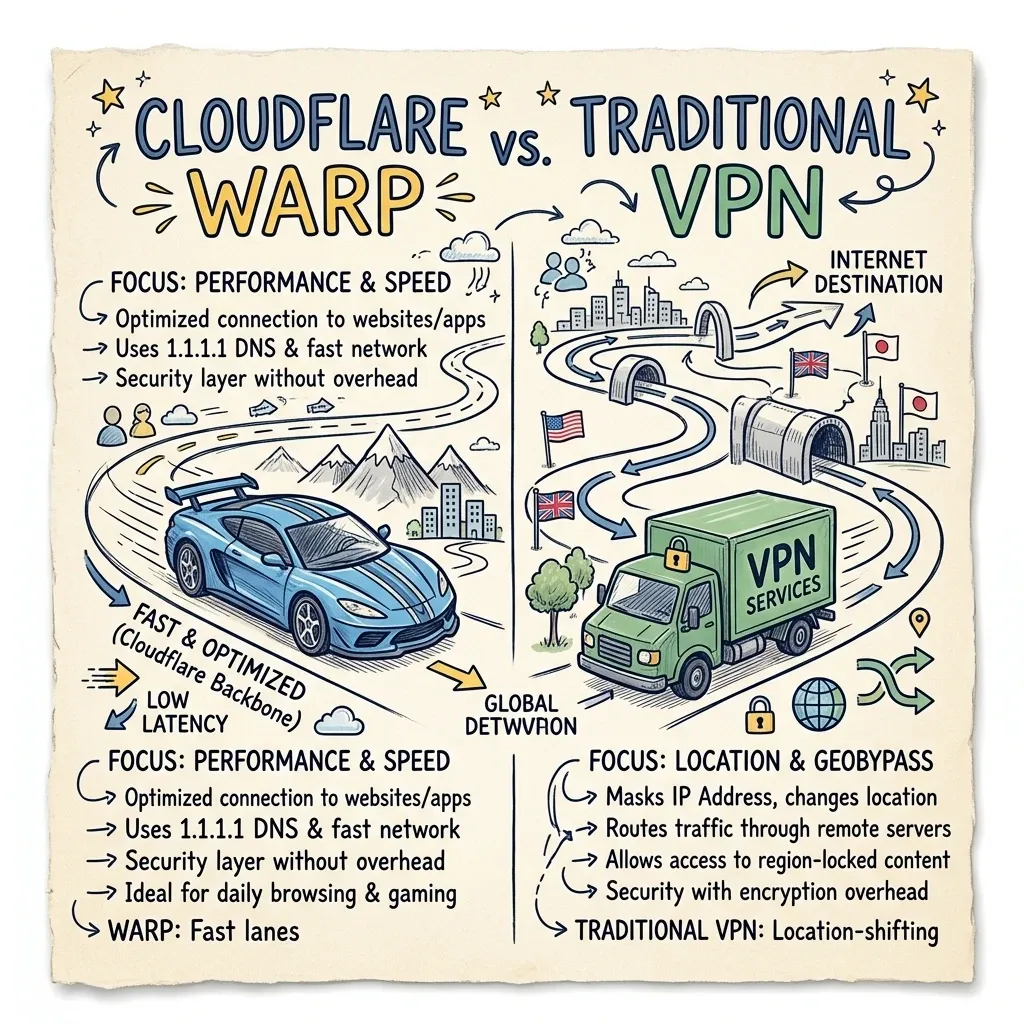 Image Prompt: A premium hand-drawn sketch note diagram illustrating the difference between Cloudflare WARP and a traditional VPN, depicting a fast sports car (WARP: speed, latency) and a delivery truck (traditional VPN: locations, geobypass). Cute hand-drawn vehicle doodles, arrows, and stars on a cream paper background.
Think of it like choosing between a sports car and a delivery truck. WARP is the sports car - fast, efficient, and focused on getting you where you need to go quickly. Traditional VPNs are more like delivery trucks - bulkier, slower, but capable of carrying you anywhere in the world.
Is Cloudflare WARP Free?
Yes, the standard version of Cloudflare WARP is completely free with no bandwidth limits. For users looking for even faster routing, Cloudflare offers WARP+, a paid subscription that routes your traffic through Cloudflare’s Argo smart routing technology, avoiding network congestion points.
Think of free WARP as getting a basic car with essential safety features - it keeps you secure on the road. WARP+ is like upgrading to a premium sports car with advanced navigation that actively avoids traffic jams and takes the fastest routes to your destination.
Why Is the Modern Internet Unsafe by Default?
Every day, billions of devices connect to the internet through invisible pathways that most users never think about. When you open your laptop at a coffee shop, join a hotel’s guest Wi-Fi, or even browse from your living room, your data travels through a complex chain of routers, DNS resolvers, and intermediaries — many of which can see exactly where you’re going and what you’re doing.
Imagine your internet connection like sending a letter through the postal system. Without WARP, your letter travels through multiple post offices, sorting facilities, and delivery trucks. Anyone handling your letter along the way could peek inside, see where it’s going, and even tamper with its contents. Cloudflare WARP is like putting your letter in a sealed envelope with a special lock that only you and Cloudflare’s secure network can open.
Cloudflare WARP is a free security tool designed to solve a very specific problem: protecting the journey your data takes from your device to the internet, without slowing you down or requiring a computer science degree to configure. Since its launch in September 2019, WARP has evolved from a simple mobile VPN-like service into a multi-platform network security client used by millions of consumers and enterprises worldwide.
But WARP is also one of the most misunderstood tools in modern networking. It is not a traditional VPN. It will not let you watch Netflix from another country. It will not make you anonymous online. Understanding these boundaries is essential to using it correctly — and that is exactly what this article will teach you.
What Is Cloudflare WARP, Really?
At its core, WARP is a secure network tunnel that encrypts your device’s internet traffic and routes it through Cloudflare’s global network of data centers before sending it to its final destination. It is built into the same application as Cloudflare’s 1.1.1.1 DNS resolver, which launched in April 2018 as a privacy-focused alternative to ISP-provided DNS.
Think of WARP as a protective envelope for your internet connection. Without it, your data travels in something like a postcard — anyone handling it along the way can read the address and peek at the contents. With WARP, your data travels in a sealed, tamper-proof package that only you and Cloudflare’s edge can open.
The Three Pillars of WARP
WARP’s protection rests on three technical foundations:
1. Encrypted DNS (DoH/DoT): Every time you type a website address, your device must ask a DNS resolver to translate that name into an IP address. By default, these lookups are often unencrypted and visible to your ISP or local network operator. WARP encrypts every DNS query using DNS-over-HTTPS (DoH) or DNS-over-TLS (DoT), preventing eavesdropping and tampering. As of 2025, all DNS traffic flows inside the WARP tunnel by default on supported platforms.
2. Modern Tunneling Protocols: WARP originally used WireGuard via Cloudflare’s Rust-based implementation, BoringTun. In 2025, Cloudflare transitioned consumer WARP apps to use MASQUE (Multiplexed Application Substrate over QUIC Encryption) by default — a modern framework that tunnels traffic over HTTP/3 and QUIC. This makes WARP traffic resemble ordinary web traffic, improving resilience on restrictive networks like hotel or corporate Wi-Fi. WireGuard remains available as an alternative.
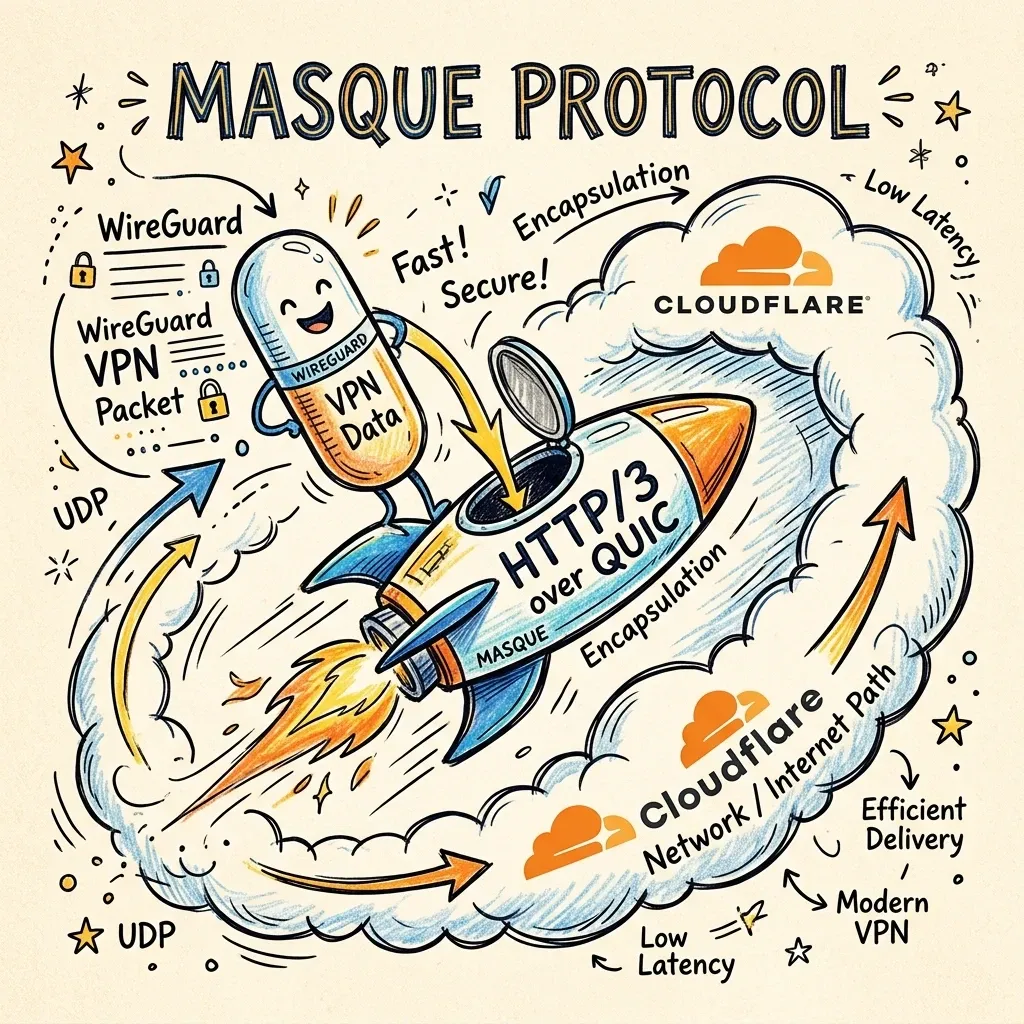 Image Prompt: A premium hand-drawn sketch note doodle explaining MASQUE protocol. It shows a container or capsule labeled ‘WireGuard VPN Packet’ being placed inside a fast rocket labeled ‘HTTP/3 over QUIC’ flying through a Cloudflare cloud tunnel. Playful hand-drawn arrows, stars, and speed lines on a warm cream paper background.
3. Global Edge Routing: Rather than connecting you to a server in a country of your choice, WARP connects you to the nearest Cloudflare data center — of which there are over 310 cities across 120+ countries. This proximity-first approach minimizes latency while still shielding your local IP from the websites you visit.
Think of this like choosing the closest Starbucks to your house instead of driving across town to a distant coffee shop. You get fresher coffee (faster internet) and don’t waste gas (bandwidth). The same principle applies to your internet traffic — the closer the connection, the faster and more efficient it is.
What Happens When You Press “Connect”?
To understand WARP’s value, you need to understand the journey your data takes. Let’s walk through it step by step.
Without WARP (The Default Path)
- DNS Lookup: You type
example.cominto your browser. Your device sends an unencrypted DNS query to your ISP’s resolver (or whatever your router is configured to use). Your ISP logs this request and knows you’re visitingexample.com. - Connection Establishment: Your device connects directly to the website’s server. The website sees your real IP address, which reveals your approximate geographic location and ISP.
- Data Transmission: If you’re on public Wi-Fi, every packet of data travels through the local network unencrypted (for HTTP sites) or encrypted only at the application layer (for HTTPS). A malicious actor on the same network can observe your DNS queries, see which sites you visit, and potentially intercept unencrypted traffic.
With WARP (The Protected Path)
- Tunnel Initialization: When you press connect, the WARP client establishes an encrypted tunnel to the nearest Cloudflare Point of Presence (PoP) using either MASQUE over QUIC or WireGuard. This handshake uses modern cryptography, including post-quantum cryptography (PQC) support to protect against future “harvest now, decrypt later” threats.
- Encrypted DNS: Your DNS query for
example.comis encrypted and sent through the tunnel to Cloudflare’s 1.1.1.1 resolver. Your ISP sees only encrypted traffic to Cloudflare — it cannot tell which websites you’re visiting. - IP Masking: Cloudflare forwards your request to the destination website using a Cloudflare IP address that represents your approximate geographic region. The website does not see your real home or mobile IP. (Note: Cloudflare updated its consumer WARP service to no longer expose your actual IP address to Cloudflare-protected sites.)
- Return Traffic: The website’s response travels back to Cloudflare’s edge, through the encrypted tunnel, and finally to your device. The entire round trip is shielded from local network observers.
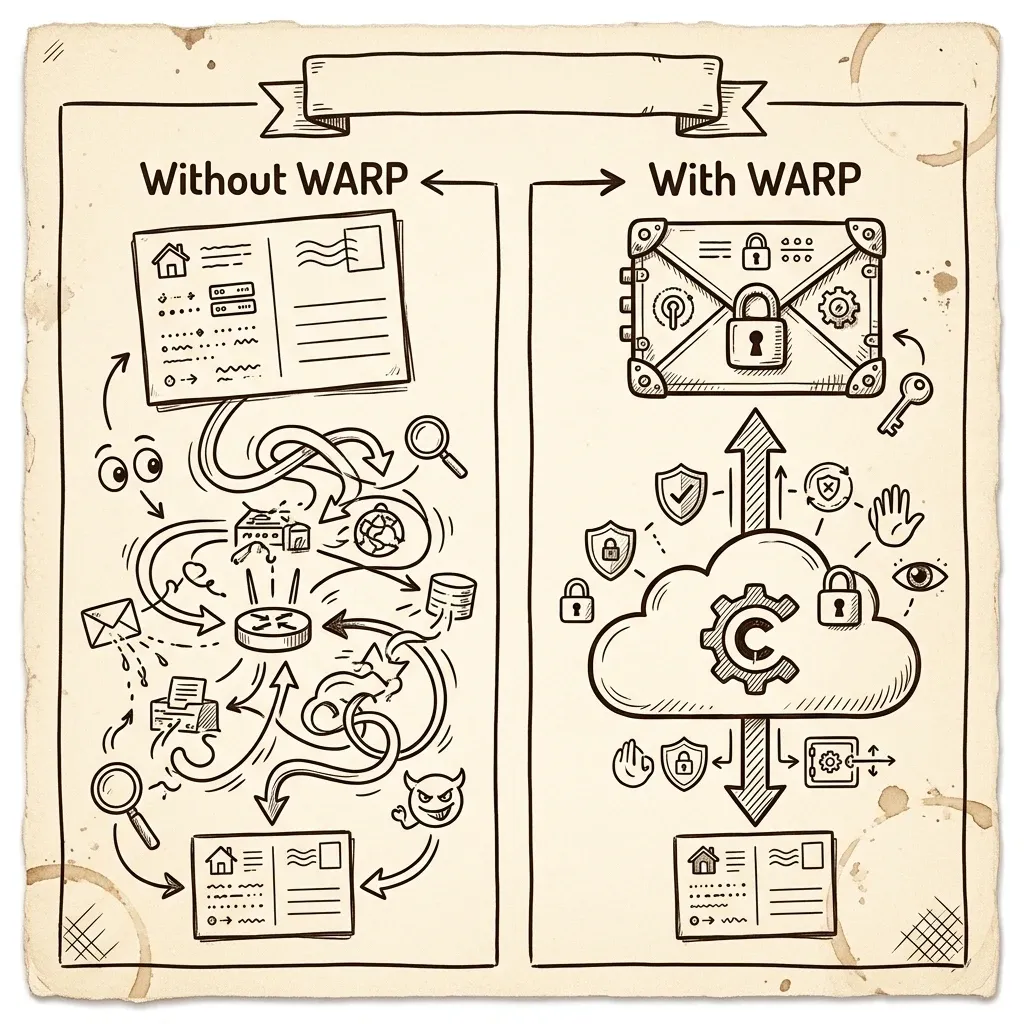 Image Prompt: A premium hand-drawn sketch note diagram comparing ‘Without WARP’ vs ‘With WARP’ traffic flows. On the left, an open postcard representing exposed ISP routing. On the right, a locked vault envelope representing a secure encrypted tunnel to Cloudflare. Hand-drawn arrows and playful doodles on a warm cream paper background.
Why This Matters: The Anycast Advantage
Cloudflare uses Anycast routing — a networking technique where the same IP address is announced from hundreds of locations worldwide. When your device connects to WARP, it doesn’t need to “choose” a server; the internet’s routing infrastructure automatically directs you to the closest, healthiest Cloudflare data center. This is why WARP can feel faster than traditional VPNs, which often force you to connect to a specific, distant server.
Think of it like having a network of post offices around the world. When you send a letter, it automatically goes to the nearest post office instead of forcing you to choose one across the country. This is why WARP feels faster - it’s like having a post office on every corner.
Why Is Cloudflare WARP Not an Anonymity Tool?
This is the most important section. If you take nothing else away, remember this: WARP is not designed to hide your identity or spoof your location.
What WARP Does NOT Do
- No Country Selection: Unlike commercial VPNs such as NordVPN or ExpressVPN, WARP does not let you choose an exit node in a specific country. You cannot use it to watch geo-restricted content, access region-locked services, or appear to be browsing from another continent. WARP always connects you to the nearest Cloudflare data center.
- No Complete Anonymity: WARP encrypts your traffic from your device to Cloudflare, but Cloudflare itself can see metadata about your connection. While Cloudflare states it does not log browsing history or sell data, you are shifting trust from your ISP to Cloudflare — not eliminating the need for trust entirely.
- No P2P or Torrent Protection: WARP is not designed for peer-to-peer file sharing, and its terms of service do not position it as a tool for circumventing copyright enforcement or geographic restrictions.
Why WARP Shares Your Approximate Location
WARP intentionally preserves your approximate geographic region when communicating with websites. If you’re in London, websites will generally see a Cloudflare IP associated with the London region. This is a deliberate design choice for speed optimization. By not routing your traffic through a distant data center, WARP avoids the latency penalties that make traditional VPNs feel sluggish.
If you need to appear to be browsing from a different country, WARP is the wrong tool. A commercial VPN with explicit location selection would be more appropriate.
What Data Does Cloudflare Collect from WARP Users?
Privacy claims are only as good as the data practices behind them. Cloudflare has published specific commitments for its consumer WARP service, and understanding them is crucial for informed use.
What Cloudflare Does NOT Collect
- No browsing history: Cloudflare does not write user-identifiable log data to disk for the consumer WARP service.
- No traffic content: The contents of your encrypted HTTPS traffic (passwords, messages, emails) remain invisible to Cloudflare. WARP operates at the network layer, not the application layer.
- No selling of data: Cloudflare explicitly states it does not sell browsing data or use it for advertising targeting.
- No personal information required: You can use WARP without providing your name, phone number, or email address.
What Cloudflare Does Collect
According to Cloudflare’s official WARP privacy documentation, the service collects limited metadata necessary to operate the service:
- App Installation ID: A random identifier generated when you install the app, used for referral bonuses and WARP+ quota tracking.
- Data Transfer Volume: The amount of data transferred through Cloudflare’s network, used to track WARP+ usage limits.
- Average Speed: Performance metrics to help Cloudflare improve the application in your region and on your specific carrier or ISP.
- Aggregate Traffic Patterns: Cloudflare tracks aggregate traffic by website and region for capacity planning and data center expansion.
The KPMG Audit Context
In 2020, KPMG examined Cloudflare’s privacy commitments for the 1.1.1.1 public DNS resolver (not the full WARP tunneling service). The audit found that Cloudflare generally followed its commitments to anonymize source IP addresses and delete logs within 25 hours. However, this audit was specific to the DNS resolver and does not cover WARP’s full tunneling service. Users should understand this distinction when evaluating privacy claims.
What Is the Difference Between WARP and WARP+?
Cloudflare offers two consumer tiers: the free WARP and the paid WARP+ (also referred to as WARP+ Unlimited).
Free WARP
- Cost: Completely free, unlimited data.
- Encryption: Identical to WARP+.
- Routing: Standard internet routing after your traffic exits Cloudflare’s edge.
- Best For: Everyday users who want basic security and DNS privacy without paying.
WARP+ (Paid Subscription)
As of November 2025, WARP+ is a paid monthly subscription with no data limits. The referral program that previously allowed users to earn free data has been discontinued.
- Cost: Approximately $5–$10 per month depending on your region and app store pricing. The subscription is generally limited to five devices per account.
- Core Benefit: Argo Smart Routing: WARP+ routes your traffic through Cloudflare’s private backbone network (Argo), which uses real-time congestion data to avoid slow or overloaded internet paths. Cloudflare claims this improves performance by approximately 30% on average, though results vary significantly by geography, destination, and network conditions.
- Privacy Model: Identical to free WARP. WARP+ does not change what data is collected or how it is handled.
Is WARP+ Worth It?
For most casual users browsing social media, reading news, and streaming video, free WARP provides sufficient security. WARP+ becomes valuable if you:
- Frequently work with cloud apps or remote servers where latency matters
- Experience inconsistent performance on your local ISP during peak hours
- Need the most stable connection for video calls or online gaming
When and Why Should You Use Cloudflare WARP?
Theory is useful, but practical application is what matters. Here are four primary use cases that illustrate WARP’s real-world value.
Use Case 1: The Coffee Shop Shield (Public Wi-Fi Protection)
Scenario: You’re working remotely from a café, airport lounge, or hotel lobby. The Wi-Fi network is open or uses a simple shared password. Other users are on the same network.
The Risk: On public Wi-Fi, your device is visible to anyone else on the network. An attacker can:
- See your DNS queries (which websites you’re visiting)
- Attempt man-in-the-middle attacks on unencrypted HTTP traffic
- Use ARP spoofing to redirect your traffic through their machine
- Harvest metadata about your device and browsing habits
How WARP Helps: WARP encrypts every packet leaving your device from the moment it connects to the network. Your DNS queries are encrypted and tunneled to Cloudflare. Even if an attacker is monitoring the local network, they see only encrypted traffic flowing to Cloudflare — not your actual destinations. Your local IP is masked, making it harder to target your device directly.
Real-World Impact: You can check your bank account, log into work email, or browse sensitive sites with confidence, knowing that the local network operator or a malicious fellow guest cannot intercept your traffic.
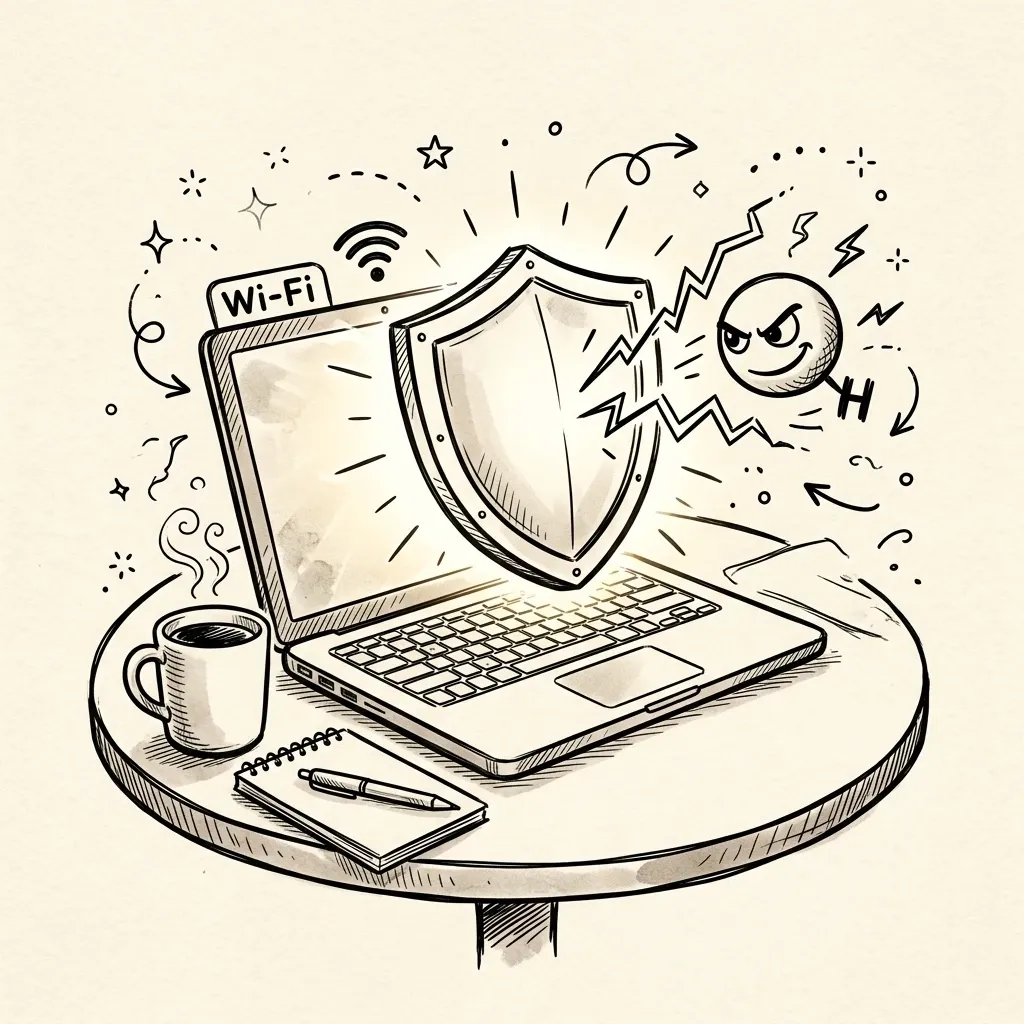 Image Prompt: A premium hand-drawn sketch note doodle representing public Wi-Fi security. A cozy coffee shop table with a laptop, steaming coffee mug, and a glowing shield icon hovering over the screen to block a mischievous hacker eyeball symbol.
Use Case 2: Bypassing Network Throttling and Congestion
Scenario: Your home ISP or mobile carrier slows down certain types of traffic during peak hours. You notice that video streaming buffers, file downloads crawl, or cloud backups stall in the evenings.
The Risk: ISPs can and do implement traffic shaping — deliberately slowing down specific protocols, services, or destinations to manage network congestion. They can see where your traffic is going and apply throttling rules accordingly.
How WARP Helps: Because WARP encrypts your traffic and routes it through Cloudflare’s network, your ISP sees only an encrypted connection to Cloudflare — not the final destination. It cannot easily categorize your traffic for throttling purposes. Additionally, Cloudflare’s Anycast network often finds more efficient paths than your ISP’s default routing, potentially bypassing congested exchange points.
Real-World Impact: Smoother video calls, faster cloud sync, and more consistent performance during peak usage periods. Note that WARP cannot increase your physical bandwidth; it helps avoid artificial slowdowns imposed by routing inefficiencies or ISP throttling.
 Image Prompt: A premium hand-drawn sketch note doodle representing network congestion. A highway split in two: the left lane has a stop sign and a slow crawling turtle (ISP throttling), while the right lane has a fast rocket or shooting star passing through a Cloudflare cloud tunnel.
Use Case 3: The Remote Work Security Baseline
Scenario: You’re a freelancer, consultant, or remote employee who handles client data from various locations — home offices, coworking spaces, and client sites.
The Risk: Your employer or clients may have compliance requirements (GDPR, HIPAA, SOC 2) that mandate encrypted connections. Using unencrypted DNS or exposing your real IP could create liability or violate data handling agreements.
How WARP Helps: WARP provides a baseline of encrypted DNS and tunneled traffic without requiring IT department configuration. It ensures that your DNS lookups are private and that your traffic is encrypted from your device to Cloudflare’s edge. For organizations using Cloudflare Zero Trust (covered in later articles), WARP becomes the gateway to enterprise security policies.
Real-World Impact: You meet minimum security hygiene standards without complex setup. When combined with strong passwords, device encryption, and endpoint protection, WARP forms a foundational layer of your security posture.
Use Case 4: DNS Privacy at Home
Scenario: You want to prevent your home ISP from building a profile of your browsing habits based on your DNS queries. Even if you use HTTPS websites, your ISP can still see every domain you visit through unencrypted DNS.
The Risk: DNS queries are essentially the address book of your internet activity. Your ISP can log these, sell aggregated data, or use them to inject ads or redirect traffic. In some regions, governments mandate DNS logging for surveillance purposes.
How WARP Helps: By routing all DNS queries through encrypted DNS-over-HTTPS to 1.1.1.1, WARP ensures your ISP cannot see which domains you look up. Cloudflare’s resolver has been audited for privacy practices and commits to not selling or sharing query data.
Real-World Impact: Your browsing habits remain private from your ISP. This is particularly valuable in regions with aggressive data retention policies or where ISPs monetize customer browsing data.
 Image Prompt: A premium hand-drawn sketch note doodle representing DNS privacy. A home workspace with a computer screen showing a lock over web addresses, while an ISP eyeball or camera symbol tries to peek but is blocked by a secure 1.1.1.1 shield.
Who Is Cloudflare WARP Not Suitable For?
Being honest about limitations is as important as explaining benefits. WARP is not the right tool if you:
- Need geo-unblocking: If you want to access Netflix libraries from other countries, bypass sports blackouts, or view region-restricted content, WARP will not help. You need a commercial VPN with location selection.
- Require total anonymity: Journalists, activists, and whistleblowers operating under high-threat models need tools specifically designed for anonymity (such as Tor), not a performance-optimized tunnel that concentrates trust in a single corporate entity.
- Need a fixed corporate IP: If your work requires a static IP address for allow-listing (e.g., accessing a corporate database that restricts connections by IP), WARP cannot provide this. Cloudflare’s consumer IPs are dynamic and shared.
- Engage in P2P file sharing: WARP is not designed for torrenting, and its terms of service do not accommodate this use case.
How Can You Get Started with Cloudflare WARP?
As of July 2026, WARP is available on:
- iOS (iPhone/iPad)
- Android
- Windows
- macOS
- Linux (with both CLI and a system tray GUI interface)
The setup process is intentionally simple: download the app, install it, and tap “Connect”. No server lists to choose from, no protocols to configure, and no accounts required for the free tier.
For Linux users, installation varies by distribution (Ubuntu/Debian via apt, RHEL 9 via dnf with EPEL repository activation), which we will cover in detail in Article 2.
Conclusion: Is WARP the Right Choice for Your Security Baseline?
Cloudflare WARP is one of the most accessible security tools available today. It requires no technical expertise, costs nothing for its core features, and provides genuine protection against the most common threats average users face: eavesdropping on public Wi-Fi, ISP-level DNS tracking, and network-based traffic manipulation.
But WARP’s power comes from understanding its purpose, not exaggerating it. It is a secure tunnel to the internet, not an invisibility cloak. It prioritizes speed and reliability over geographic flexibility. It shifts trust from your ISP to Cloudflare, with clear (if limited) data collection practices.
For the everyday web user, the remote worker at a coffee shop, or the privacy-conscious home browser, WARP represents an excellent first line of defense. It is the digital equivalent of locking your front door: it won’t stop a determined nation-state attacker, but it will keep out the vast majority of casual threats you encounter every day.
Frequently Asked Questions
Does Cloudflare WARP change my IP address?
Yes, WARP masks your local home or mobile IP address with a Cloudflare IP address representing your approximate geographic region. However, unlike traditional VPNs, it does not allow you to choose to exit from other countries to bypass geographic streaming restrictions.
Is Cloudflare WARP safe for torrenting and P2P sharing?
While WARP encrypts your connection from your device to the Cloudflare network edge, it is not designed or optimized for peer-to-peer file sharing (P2P), and its terms of service do not support bypassing copyright filters.
Does Cloudflare WARP slow down my internet connection?
Because WARP connects to the nearest Cloudflare data center using high-performance protocols like MASQUE or WireGuard, it has a minimal latency penalty compared to traditional VPNs. For paid WARP+ users, Argo Smart Routing may actually improve speeds on congested networks.
Series Navigation: Article 1: Beginner’s Guide → Article 2: Mac & Linux Install → Article 3: Client Modes Explained → Article 4: Power-User Settings → Article 5: Enterprise Zero Trust → Article 6: Pro Troubleshooting → Article 7: WARP vs. Alternatives
Next: Part 2: The Multi-OS Installation Guide — macOS & Linux