

I remember when Copilot first came out. It felt like magic. For the last two years, we’ve been in this comfortable era of AI assistants hovering in our sidebars, just waiting for us to ask a question. But with March 2026 here, things are changing fast. We are in the Agentic Era. The two tools defining it—Cursor and Google Antigravity—are no longer just simple autocomplete plugins. They are operating systems for your code.
Google AntiGravity is now on v1.20.5, powered by Gemini 3.1 Pro. Meanwhile, Cursor hit v2.6.20 this month, finally launching JetBrains support and interactive UIs in agent chats.
If you choose the wrong one, you’ll either be fighting your IDE’s lag or drowning in a monthly subscription that costs more than your car insurance. Here is the objective breakdown.
1. The Core Philosophy: “Centaur” vs. “Manager”
To choose the right tool, you have to understand why they exist. They aren’t trying to solve the same problem.
Cursor: The “Centaur” Model (You-First)
Cursor thinks you are the bottleneck. Their goal is to make you a hybrid of human creativity and machine speed. It’s built for the developer who wants to stay in the zone. They are obsessed with latency. They want the AI to predict your next 10 lines before you even think of them.
The Scenario: You’re working on a complex state transition in React. You have the logic in your head, but typing out the 50 lines of boilerplate is going to take five minutes and break your focus. Cursor’s “Tab” prediction sees your first two lines and fills the rest instantly. You never take your hands off the keyboard.
Google AntiGravity: The “Manager” Model (Agent-First)
Google thinks the act of coding is the bottleneck. Their goal is to turn you into an architect. You don’t write code; you manage agents that write it for you. It’s about delegation.
The Scenario: You need to migrate an entire authentication module from custom JWTs to OAuth2. Instead of doing it yourself, you assign the task to an AntiGravity agent. You go grab coffee. While you’re gone, the agent creates a plan, writes the code, opens a headless browser to test the login flow, and has a report waiting for you when you get back.
2. Google AntiGravity v1.20.5 Deep Dive
AntiGravity isn’t just a VS Code fork. It’s a Trojan horse for the Google Cloud ecosystem. It integrates Gemini 3.1 Pro with Chrome and Google Cloud compute.
The 1M Token Context Window
This is the big one. Cursor relies on RAG (searching for small chunks of code). AntiGravity just ingests your entire repository into active memory. It understands how a change in your api.ts affects a component three directories away without needing to search.
The Scenario: You’re working on a massive, messy legacy repo with zero documentation. You ask the agent: “How does the billing logic handle partial refunds?” Because of the 1M context window, the agent doesn’t just guess; it “reads” the entire project and gives you a cited answer based on code written in 2019.
The Browser Subagent (Visual Verification)
This is AntiGravity’s killer feature. It uses vision-optimized models to actually “look” at your app.
The Scenario: You’re trying to fix a CSS alignment issue that only happens on mobile. You tell the agent: “Fix the navbar padding on small screens.” The agent spins up your local server, opens a headless Chrome instance, takes a screenshot, analyzes the pixels, applies a fix, and re-takes the screenshot to verify it worked. You didn’t even have to refresh your browser.
Nano Banana: Built-in Asset Generation
Google integrated an image generator directly into the IDE.
The Scenario: You’re building a landing page and need a placeholder icon for a “Secure Vault” feature. Instead of searching Unsplash for 10 minutes, you ask the agent: “Generate a 4K neon-indigo vault icon.” It appears in your assets folder instantly. No licensing headaches.
3. Cursor v2.6.20 Deep Dive
Cursor is for people who love their IDE but hate friction. The v2.6 update finally brought the features backend developers have been begging for.
JetBrains Support (The Watershed Moment)
As of March 4, 2026, Cursor isn’t just for VS Code fans. It integrates natively with IntelliJ, PyCharm, and WebStorm.
The Scenario: You’re a Java developer who loves IntelliJ’s debugger but envies the agentic features of Cursor. You install the Cursor ACP plugin. Now you have full codebase indexing and agentic refactoring inside your favorite Java IDE. No compromise.
The Shadow Workspace
This is a brilliant piece of engineering. AI often suggests code that looks right but has syntax errors.
The Scenario: You ask the AI to refactor a Python function. In the background, Cursor spins up a hidden “Shadow” instance of your editor, applies the change, and runs the linter. If there’s a “red squiggle” (like a missing import), the AI catches it and fixes it before showing you the suggestion. It feels like the AI never makes mistakes.
Composer (Multi-File Editing)
Composer (Cmd+I) is Cursor’s multi-file agent. It can modify 50 files at once while you watch.
The Scenario: You’re renaming a core database field. You use Composer. It updates the Prisma schema, the backend resolvers, the frontend types, and the test suite in one go. You watch the diffs fly by, hit “Accept All,” and the task is done in 30 seconds.
4. Head-to-Head Comparison
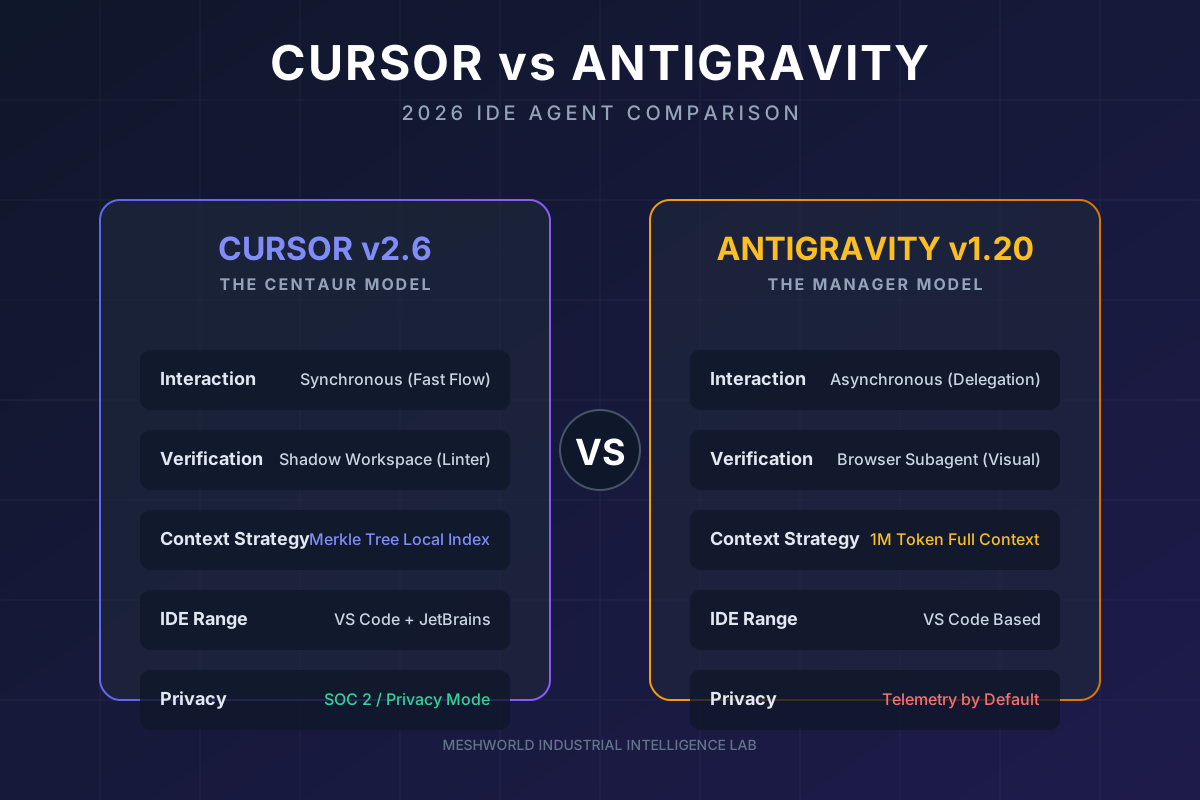
| Feature | Cursor v2.6.20 | Google AntiGravity v1.20.5 |
|---|---|---|
| Primary Interaction | Synchronous (Tab & Edit) | Asynchronous (Task Delegation) |
| Context Strategy | Local Indexing + RAG | 1M Token Context Window |
| Visual Verification | None | Yes (Browser Subagent) |
| IDE Reach | VS Code + JetBrains | VS Code only |
| Privacy | Privacy Mode (SOC 2) | Telemetry by default |
| Image Generation | No | Yes (Nano Banana) |
Benchmark Analysis (March 2026)
Cursor (Claude Opus 4.6) is still slightly better at pure logic and bug fixing (SWE-bench). It makes fewer subtle errors in standard code. AntiGravity (Gemini 3.1 Pro) is the undisputed king of UI and vision. If you are doing heavy frontend work or complex multi-step reasoning, Antigravity has the edge.
5. Pricing and the “Agent Trap”
Cursor Pricing
- Pro: $20/month. Great for individuals.
- Ultra: $200/month. For people who want 20x the usage and priority access.
- Why it’s predictable: You get a set pool of credits.
AntiGravity Pricing
- Pro: $20/month (via Google AI Pro).
- Ultra: $249.99/month. This is a massive jump that many developers are criticizing.
- The Trap: “Agentic loops” are expensive. One task might run for 20 minutes and burn through your entire daily quota. Pro users often report multi-day lockouts after one intensive session.
6. The Verdict: Which One Should You Use?
Use Cursor if:
- You live in JetBrains (IntelliJ, PyCharm).
- You are a “Flow” Coder who wants to type faster.
- You need Enterprise Privacy (Zero-retention guarantees).
- You want to switch between GPT-5.2, Claude 4.6, and Gemini 3 easily.
Use Antigravity if:
- You are a Frontend Developer who needs visual verification.
- You work on Legacy Code that requires a 1M context window.
- You want to Delegate Chores (unit tests, documentation) and walk away.
- You are already deep in the Google Cloud / Firebase ecosystem.
FAQ
Can I use VS Code extensions in AntiGravity? Mostly. It’s a fork, so most work. But proprietary Microsoft extensions (like the C# debugger) are blocked.
Is “Vibe Coding” real? It is in 2026. You describe the “vibe” or high-level intent, and tools like Antigravity handle the implementation. It’s the highest level of abstraction we’ve ever had.
Why is AntiGravity so expensive? Running a 1M token context window and a vision-capable browser subagent costs a fortune in compute. Google is passing those costs to you.
Looking for more AI Agent comparisons? Check out our AI Agent Frameworks Guide to see how to build your own.
