Section 1: What Are Autonomous AI Agents?
Picture this: It’s 2 AM. Your production database is experiencing unusual latency spikes. Instead of waking up your on-call engineer, an AI agent automatically detects the anomaly, analyzes CloudWatch logs, identifies a poorly optimized query, implements a temporary fix, and sends a detailed incident report to your team’s Slack channel—all before your morning coffee brews.
This isn’t science fiction. This is the reality of autonomous AI agents in 2026.
The Evolution from Chatbots to Agents
For years, we’ve interacted with AI through simple prompt-response patterns. You ask, it answers. You command, it executes. But there’s a fundamental limitation: these systems don’t persist, don’t plan, and don’t act independently.
┌──────────────────────────────────────────────────────────┐
│           TRADITIONAL AI INTERACTION MODEL               │
├──────────────────────────────────────────────────────────┤
│                                                          │
│   User Prompt ──▶  LLM  ──▶  Response                    │
│                                                          │
│   ❌ No memory between sessions                          │
│   ❌ No ability to use tools                             │
│   ❌ No autonomous decision-making                       │
│   ❌ No multi-step reasoning                             │
│                                                          │
└──────────────────────────────────────────────────────────┘
Now contrast that with an AI agent:
┌──────────────────────────────────────────────────────────┐
│              AUTONOMOUS AI AGENT MODEL                   │
├──────────────────────────────────────────────────────────┤
│                                                          │
│                    ┌──────────────┐                      │
│                    │   GOAL       │                      │
│                    │ "Monitor     │                      │
│                    │  database    │                      │
│                    │  health"     │                      │
│                    └──────┬───────┘                      │
│                           │                              │
│                           ▼                              │
│                    ┌───────────────┐                     │
│              ┌────▶│    PLAN       │◀─────┐              │
│              │     │ Break down    │      │              │
│              │     │ into steps    │      │              │
│              │     └─────┬─────────┘      │              │
│              │           │                │              │
│              │           ▼                │              │
│              │     ┌───────────────┐      │              │
│              │     │   ACT         │      │              │
│              │     │ Use tools:    │      │              │
│              │     │ - CloudWatch  │      │              │
│              │     │ - RDS API     │      │              │
│              │     │ - Lambda      │      │              │
│              │     └───────────────┘      │              │
│              │           │                │              │
│              │           ▼                │              │
│              │     ┌───────────────┐      │              │
│              └─────│    OBSERVE    │──────┘              │
│                    │ Check results │                     │
│                    │   Adapt plan  │                     │
│                    └───────────────┘                     │
│                                                          │
│   ✅ Persistent memory                                   │
│   ✅ Tool integration                                    │
│   ✅ Autonomous reasoning                                │
│   ✅ Multi-step execution                                │
│                                                          │
└──────────────────────────────────────────────────────────┘
Why 2026 is the Year of AI Agents
Three converging trends have made autonomous agents not just possible, but practical for production:
-
Foundation Model Maturity: Modern LLMs can reliably reason through complex, multi-step problems without hallucinating at every turn.
-
Tool Ecosystem Standardization: Protocols like MCP (Model Context Protocol) allow agents to interact with thousands of tools through a unified interface.
-
Cloud-Native Infrastructure: Services like Amazon Bedrock provide the scalable, secure backbone agents need to operate 24/7.
According to Gartner’s 2026 predictions, 40% of enterprise applications will incorporate agentic AI workflows, up from less than 5% in 2024. The question isn’t whether you’ll build agents—it’s which framework you’ll use.
Section 2: What Is AWS Strands Agents?
The Official Definition
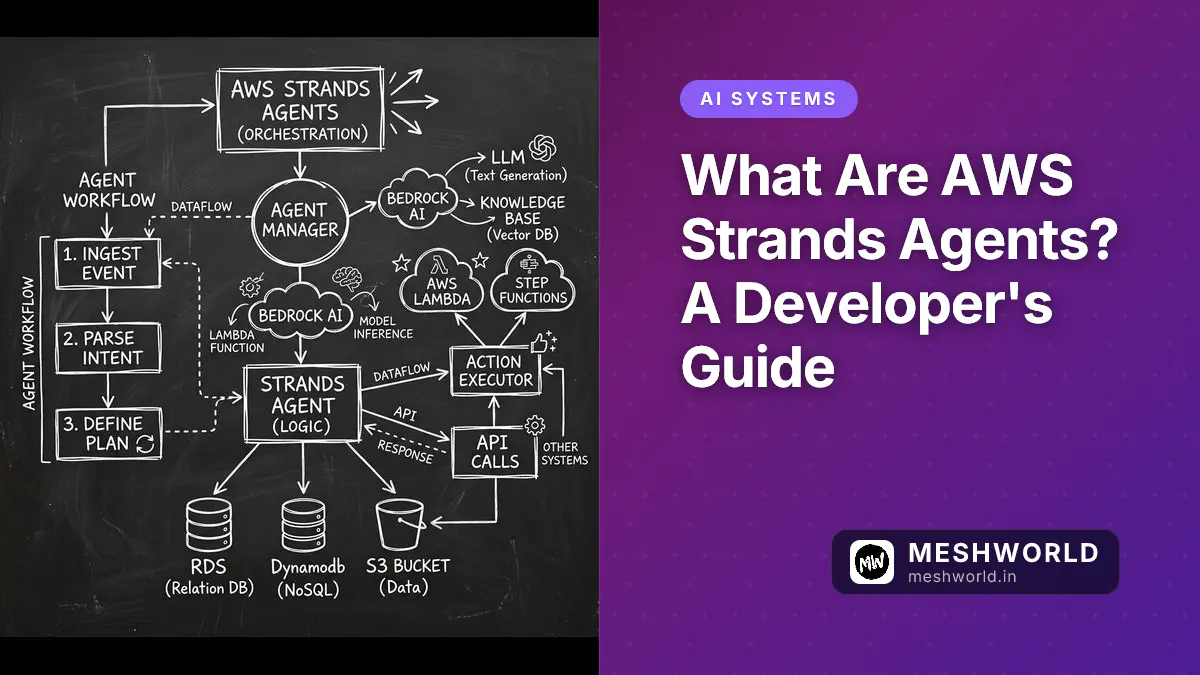
AWS Strands Agents is an open-source SDK that takes a model-driven approach to building and running AI agents in just a few lines of code. Launched by AWS in May 2025, it’s designed to abstract away the complexity of agent orchestration while giving developers fine-grained control over behavior, tools, and memory.
┌──────────────────────────────────────────────────────────┐
│             AWS STRANDS AGENTS AT A GLANCE               │
├──────────────────────────────────────────────────────────┤
│                                                          │
│   📦 Type: Open-source SDK (Apache 2.0 License)          │
│   🐍 Languages: Python & TypeScript                      │
│   🤖 Models: Bedrock, OpenAI, Anthropic, Mistral, etc.   │
│   🛠️  Tools: 20+ pre-built + custom tools                │
│   📍 GitHub: github.com/awslabs/strands-agents           │
│   📅 Launch: May 2025                                    │
│                                                          │
└──────────────────────────────────────────────────────────┘
The “Model-Driven” Philosophy Explained
Here’s where Strands differs fundamentally from frameworks like LangChain or LlamaIndex.
Traditional (Imperative) Approach:
# You explicitly code every step
def handle_user_request(user_input):
    # Step 1: Parse intent
    intent = classifier.predict(user_input)

    # Step 2: Choose tool
    if intent == "weather":
        result = weather_api.get_forecast(user_input)
    elif intent == "database":
        result = db_query_executor.run(user_input)

    # Step 3: Format response
    response = formatter.format(result)
    return response
Strands (Model-Driven) Approach:
# You declare the BEHAVIOR, the model figures out the rest
from strands import Agent
from strands.tools import AWSTools

agent = Agent(
    model="bedrock/anthropic.claude-3-sonnet",
    tools=[AWSTools.cloudwatch(), AWSTools.dynamodb()],
    system_prompt="You are a DevOps assistant that monitors AWS resources"
)

# The agent autonomously decides:
# - Which tool to use
# - In what order
# - How to handle errors
# - When to ask for clarification
response = agent("Why is my RDS instance slow?")
The key insight: Instead of writing imperative logic chains, you define:
- What the agent should do (system prompt)
- What tools it can use (tool definitions)
- Which model powers it (foundation model)
The agent’s reasoning engine (powered by the LLM) handles the orchestration automatically.
Why AWS Built Strands (And Why It Matters)
You might wonder: AWS already has Bedrock Agents. Why create another agent framework?
Great question. Here’s the distinction:
┌──────────────────────────────────────────────────────────┐
│         AWS BEDROCK AGENTS vs STRANDS AGENTS             │
├──────────────────────────────────────────────────────────┤
│                                                          │
│   BEDROCK AGENTS                STRANDS AGENTS           │
│   ─────────────                ──────────────            │
│                                                          │
│   🎯 Low-code/No-code           🎯 Developer-first       │
│   🖱️  Console-based UI          💻 Code-first SDK        │
│   🔒 AWS-only models            🔓 Multi-model support   │
│   📦 Managed service            📦 Self-hosted option    │
│   🚀 Quick setup                🚀 Maximum flexibility   │
│   🎨 Limited customization      🎨 Full code control     │
│   💰 Pay-per-use                💰 Pay for infra only    │
│                                                          │
│   BEST FOR:                   BEST FOR:                  │
│   - Business analysts         - Software engineers       │
│   - Rapid prototyping         - Production systems       │
│   - Simple workflows          - Complex orchestration    │
│   - Non-technical users       - GitOps/CI/CD pipelines   │
│                                                          │
└──────────────────────────────────────────────────────────┘
Strands fills a gap I’ve run into myself: It gives developers the power to build powerful agents without reinventing the wheel for every project. You get:
- Pre-built integrations with AWS services
- Standardized patterns for memory, tools, and multi-agent collaboration
- Production-ready features like observability, retries, and error handling
- Open-source freedom to modify, extend, and self-host
Real-World Analogy: Building a House
Think of building an AI agent like constructing a house:
-
From scratch (raw LLM APIs): You’re mixing your own concrete, cutting your own lumber, and wiring every outlet by hand. Possible, but exhausting.
-
LangChain/LlamaIndex: You get prefabricated walls and pre-hung doors. Faster, but you still need to design the floor plan and coordinate every trade.
-
Bedrock Agents: You’re buying a fully furnished model home. Move-in ready, but you can’t knock down walls or add a second floor.
-
Strands Agents: You’re working with a modular home kit. The foundation, framing, and utilities are standardized and tested. But you can customize the layout, add rooms, and upgrade finishes with code.
Quick Reality Check: What Strands Is NOT
Before we go further, let’s dispel some myths:
❌ NOT a replacement for LangChain
If you need maximum flexibility and don’t mind writing orchestration logic, LangChain is still valid. Strands is opinionated by design.
❌ NOT a low-code tool
You still need to write code. But you write less code to achieve more.
❌ NOT AWS vendor lock-in
Despite being AWS-led, Strands is open-source (Apache 2.0) and supports OpenAI, Anthropic, Mistral, and any model with an API.
❌ NOT just for AWS services
While it has excellent AWS integrations, you can connect Strands to any tool via HTTP APIs, custom Python/TypeScript functions, or MCP servers.
Section 3: What Is Model-Driven Development in AI?
To truly master AWS Strands Agents, we must shift our mental model. For decades, software development has been imperative: we write explicit, step-by-step instructions for the computer to follow. If A happens, do B, then check C.
Strands introduces a model-driven (or declarative) approach — honestly, it changes how you think about writing code. Instead of coding the logic flow, you code the boundaries and capabilities. You define the what, and the foundation model figures out the how.
┌──────────────────────────────────────────────────────────────────────┐
│            THE PARADIGM SHIFT: IMPERATIVE vs. MODEL-DRIVEN           │
├──────────────────────────────────────────────────────────────────────┤
│                                                                      │
│  IMPERATIVE (Traditional Code)                                       │
│  ─────────────────────────────                                       │
│  Developer writes:                                                   │
│  1. Call Weather API                                                 │
│  2. If temp < 32°F, call Snowplow API                                │
│  3. If snowplow API fails, send Slack alert                          │
│  4. Return final status                                              │
│                                                                      │
│  ⚠️ Brittle: Fails if API schema changes or a new edge case appears. │
│                                                                      │
│  MODEL-DRIVEN (Strands Agents)                                       │
│  ─────────────────────────────                                       │
│  Developer provides:                                                 │
│  • Prompt: "Ensure the driveway is clear of snow."                   │
│  • Tools: [get_weather, dispatch_snowplow, send_slack_alert]         │
│  • Model: Claude 3 Sonnet                                            │
│                                                                      │
│  ✅ Resilient: The LLM dynamically sequences the tools, handles      │
│     retries, and adapts to unexpected API responses automatically.   │
│                                                                      │
└──────────────────────────────────────────────────────────────────────┘The Agent Loop: How It Actually Works Under the Hood

When you invoke a Strands Agent, it doesn’t just make a single API call. It enters a ReAct (Reasoning + Acting) loop. Here is the invisible machinery Strands manages for you:
- Observe: The agent receives the user’s prompt and reviews its current memory/state.
- Reason: The LLM analyzes the goal and decides which tool (if any) is needed next.
- Act: Strands executes the chosen tool with the parameters the LLM generated.
- Reflect: The tool’s output is fed back into the LLM’s context window.
- Repeat or Resolve: The loop continues until the goal is met or a maximum iteration limit is reached.
Here’s what that looks like in practice. Notice how little code you have to write:
from strands import Agent
from strands.tools import tool

# 1. Define a custom tool (The Capability)
@tool
def check_server_status(server_id: str) -> str:
    """Checks the health status of a specific server."""
    # Imagine this hits your internal monitoring API
    return {"status": "healthy", "cpu": "12%", "memory": "45%"}

# 2. Instantiate the Agent (The Declaration)
agent = Agent(
    model_id="anthropic.claude-3-5-sonnet-20241022",
    system_prompt="You are a Site Reliability Engineer. Diagnose issues using available tools.",
    tools=[check_server_status]
)

# 3. Invoke (The Execution)
# You don't write the 'if/else' logic. The agent does.
response = agent("Is server prod-db-01 experiencing high CPU?")

print(response.message)
# Output: "I checked server prod-db-01. Its CPU is currently at 12%, which is well within normal parameters. The server is healthy."
At meshworld.in, we love this approach because it drastically reduces boilerplate. You spend your time defining business logic (the tools) and intent (the prompt), rather than wiring together brittle API calls.
Section 4: What Are the Key Features of AWS Strands Agents?
Strands isn’t just a thin wrapper around an LLM API. It is a robust, production-grade SDK packed with features designed to solve the real-world headaches of AI development. Let’s break down the core pillars.
1. Foundation Model Agnosticism 🤖
Vendor lock-in is a major concern in AI development. Strands solves this by decoupling the agent logic from the underlying model. You can swap models with a single line of code, allowing you to balance cost, speed, and reasoning capability.
# Swap models effortlessly based on your needs
agent_fast = Agent(model_id="anthropic.claude-3-haiku-20240307")    # Cheap & Fast
agent_smart = Agent(model_id="anthropic.claude-3-5-sonnet-20241022") # Complex reasoning
agent_open = Agent(model_id="openai/gpt-4o")                         # Multi-model support
agent_local = Agent(model_id="ollama/llama3-70b")                    # Self-hosted / Privacy-focused
Note: When using Amazon Bedrock, Strands automatically handles AWS IAM authentication, making enterprise deployment straightforward.
2. Rich Tool Ecosystem & MCP Support 🛠️
An agent is only as good as the tools it can use. Strands ships with 20+ pre-built tools and supports the emerging Model Context Protocol (MCP), a universal standard for connecting AI to external systems.
Out-of-the-box tools include:
- AWS Native:
boto3wrappers for S3, DynamoDB, Lambda, and CloudWatch. - Example:
AWSTools.s3_read(),AWSTools.dynamodb_query() - Web & Network: HTTP GET/POST requests, web scraping.
- Local System: File reading/writing, directory listing, shell execution (with strict sandboxing).
Building Custom Tools is trivial:
As shown in the previous section, any Python function decorated with @tool and a clear docstring instantly becomes available to the agent. The LLM reads the docstring to understand when and how to use the tool.
3. Intelligent Memory & State Management 🧠
One of the biggest challenges in agent development is the context window limit. If an agent runs a 50-step loop, the prompt will exceed the LLM’s token limit, causing crashes or forgotten instructions.
Strands handles this via AgentCore Memory (when integrated with Bedrock) or local state management strategies:
- Sliding Window: Automatically drops the oldest, least relevant turns from the conversation history.
- Summarization: Periodically compresses long tool outputs or conversation histories into concise summaries before the context window fills up.
- Persistent State: Agents can save their state to DynamoDB or local JSON, allowing them to pause and resume long-running tasks hours or days later.
4. Enterprise-Grade Observability 🔍
In production, “the agent did something weird” is not an acceptable error message. You need to know exactly what the agent thought, which tools it called, and how long each step took.
Strands includes native observability hooks:
- Langfuse Integration: Directly push traces, latencies, and costs to Langfuse for detailed LLM monitoring of the agent’s execution path.
- Custom Callbacks: Write your own logging logic to trigger on
on_tool_start,on_tool_end, oron_agent_finish.
┌─────────────────────────────────────────────────────────────────────┐
│                  STRANDS OBSERVABILITY PIPELINE                     │
├─────────────────────────────────────────────────────────────────────┤
│                                                                     │
│  [ Strands Agent Execution ] ──▶ [ Trace Generator ]                │
│         │                             │                             │
│         ▼                             ▼                             │
│  ┌──────────────┐            ┌──────────────────┐                   │
│  │ Tool Calls   │            │ Latency & Token  │                   │
│  │ & Parameters │            │ Cost Metrics     │                   │
│  └──────────────┘            └──────────────────┘                   │
│         │                             │                             │
│         └──────────────┬──────────────┘                             │
│                        ▼                                            │
│           ┌────────────────────────┐                                │
│           │   AWS X-Ray / Langfuse │                                │
│           │   (Visual Dashboards)  │                                │
│           └────────────────────────┘                                │
│                                                                     │
└─────────────────────────────────────────────────────────────────────┘
5. Multi-Agent Collaboration Patterns 👥
Sometimes, one agent isn’t enough. Strands natively supports Multi-Agent Systems (MAS), allowing you to orchestrate teams of specialized agents.
Common patterns supported out-of-the-box:
- Supervisor-Worker: A “Manager” agent breaks down a complex task and delegates sub-tasks to specialized “Worker” agents (e.g., a Coder agent, a Reviewer agent, a Tester agent).
- Debate/Consensus: Multiple agents independently solve a problem, and a final agent synthesizes their answers to reduce hallucination.
- Sequential Handoff: Agent A completes its task and passes the structured output directly to Agent B’s input.
Section 5: How Does AWS Strands Compare to LangChain, LlamaIndex, and CrewAI?
When evaluating AI agent frameworks, developers often face “framework fatigue.” Let’s cut through the noise and objectively compare AWS Strands Agents against the most popular alternatives in the ecosystem.
AI AGENT FRAMEWORK COMPARISON MATRIX (2026)
| Feature | AWS Strands | LangChain | LlamaIndex | CrewAI |
|---|---|---|---|---|
| Primary Paradigm | Model-Driven | Imperative/Chain | Data-Driven/RAG | Role-Playing/Multi |
| Learning Curve | Low-Medium | High | Medium | Medium |
| Code verbosity | Low (Declarative) | High (Boilerplate) | Medium | Medium |
| AWS Native Tools | ⭐⭐⭐⭐⭐ (Built-in) | ⭐⭐ (Via LangChain AWS) | ⭐⭐ | ⭐ (Custom required) |
| Multi-Agent | Native Support | Via LangGraph | Limited | ⭐⭐⭐⭐⭐ (Core focus) |
| Open Source | Yes (Apache 2.0) | Yes (MIT) | Yes (MIT) | Yes (MIT) |
| Best For | Prod AWS Workflows | Highly custom logic | Advanced RAG | Autonomous teams |
Deep Dive: When to Choose Which?
1. Strands vs. LangChain
- LangChain is incredibly powerful but notoriously verbose. You often end up writing complex chains, managing state manually, and debugging obscure
Runnableerrors. - Strands abstracts this. If your goal is to give an LLM a goal and a set of tools and let it figure out the execution path, Strands requires 70% less boilerplate. Choose Strands for speed and maintainability; choose LangChain if you need absolute, granular control over every single token and state transition.
2. Strands vs. LlamaIndex
- LlamaIndex is the undisputed king of Retrieval-Augmented Generation (RAG). If your agent’s primary job is to query a massive vector database and summarize documents, LlamaIndex has superior data connectors and indexing strategies.
- Strands can use LlamaIndex as a tool, but Strands’ core strength is action and orchestration, not just retrieval. Choose Strands when the agent needs to do things (API calls, database writes) after retrieving information.
3. Strands vs. CrewAI
- CrewAI popularized the “role-playing” multi-agent paradigm (e.g., “You are a senior researcher, you are a writer”). It’s fantastic for content generation pipelines.
- Strands approaches multi-agent systems more programmatically (Supervisor-Worker, sequential handoff). It’s better suited for deterministic, enterprise software engineering tasks rather than creative content generation.
4. Strands vs. Managed AWS Bedrock Agents
- Bedrock Agents are a fully managed, console-driven experience. Great for business analysts or rapid, no-code prototyping.
- Strands is for software engineers. It lives in your codebase, integrates with your CI/CD pipeline, supports local debugging, and isn’t locked to a specific AWS console UI.
Section 6: How Is AWS Strands Agents Used in Production?
Theory is great, but how does this translate to real value? Here are three production-ready architectures you can build with Strands today.
Use Case 1: Autonomous DevOps & Cloud Remediation
The Problem: An EC2 instance runs out of disk space at 3 AM, causing a service outage. Traditional monitoring just sends a PagerDuty alert, waking up a tired engineer. The Strands Solution: An agent continuously monitors CloudWatch metrics. When disk usage exceeds 90%, it autonomously:
- Queries CloudWatch for the specific instance ID.
- Uses an SSH tool to connect and identify large log files.
- Compresses and archives old logs to an S3 bucket.
- Verifies disk space is now < 70%.
- Posts a resolution summary to the team’s Slack channel.
[ CloudWatch Alarm ] ──▶ [ Strands Agent Trigger ]
                              │
                              ├──▶ Tool: `describe_instances()`
                              ├──▶ Tool: `execute_ssh_command("du -sh /var/log/*")`
                              ├──▶ Tool: `s3_upload("archived_logs.tar.gz")`
                              └──▶ Tool: `slack_post_message("✅ Resolved: Freed 15GB on i-0abcd1234")`
Why Strands? The built-in AWS tooling and robust error-handling loops make this reliable enough for production, unlike brittle bash scripts.
Use Case 2: Intelligent Data Pipeline Orchestration
The Problem: ETL pipelines often fail due to schema drift or unexpected data formats, requiring manual intervention. The Strands Solution: An agent acts as a “Data Steward.” Before a pipeline runs, the agent:
- Samples the incoming CSV/JSON data.
- Compares it against the expected Pydantic/JSON schema.
- If there’s a mismatch (e.g., a new column
user_ageappears), the agent uses a code-execution tool to write a quick transformation script to mapuser_ageto the existingagecolumn. - Logs the schema evolution in DynamoDB for audit purposes.
Use Case 3: Internal Developer Productivity Bot
The Problem: Developers waste time context-switching to check Jira tickets, review PRs, and look up API documentation. The Strands Solution: A Slack-integrated Strands agent.
- Developer: “@dev-bot summarize the open PRs for the auth-service and check if there are any related Jira tickets.”
- Agent: Uses GitHub API tool to fetch PRs, uses Jira API tool to cross-reference ticket IDs found in the PR descriptions, and returns a concise, formatted summary.
Section 7: How Do I Get Started with AWS Strands Agents?
Ready to build? Here is your zero-to-one checklist for setting up AWS Strands Agents on your local machine.
✅ Prerequisites
- Python 3.10 or higher (Strands is optimized for modern Python features like type hinting).
- AWS Account with access to Amazon Bedrock (ensure you have requested model access for Claude 3 Sonnet/Haiku in the AWS Console).
- AWS CLI configured with an IAM role/user that has
bedrock:InvokeModelpermissions. - (Optional but recommended) Docker for isolating agent tool execution environments.
🚀 Step 1: Installation
Install the core SDK and the AWS tooling extension via pip:
# Create and activate a virtual environment
python -m venv venv
source venv/bin/activate  # On Windows: venv\Scripts\activate

# Install Strands Agents
pip install strands-agents

# Install AWS-specific tools (optional but highly recommended)
pip install strands-agents-tools-aws
💻 Step 2: Your First “Hello World” Agent
Create a file named agent.py and add the following code. This agent will fetch the current weather for a city using a mock tool (which you can easily replace with a real API like OpenWeatherMap).
import os
from strands import Agent
from strands.tools import tool

# 1. Define the capability
@tool
def get_weather(city: str) -> str:
    """Fetches the current weather for a given city."""
    # In production, replace this with a real requests.get() call
    return f"The current weather in {city} is 72°F and sunny."

# 2. Configure the Agent
# Ensure your AWS credentials are set (e.g., via aws configure)
agent = Agent(
    model_id="anthropic.claude-3-sonnet-20240229-v1:0", # Replace with actual model ID
    system_prompt="You are a helpful weather assistant. Always use the get_weather tool to answer questions.",
    tools=[get_weather]
)

# 3. Run the Agent
if __name__ == "__main__":
    print("🤖 Agent: Hello! Ask me about the weather.")
    user_input = input("You: ")

    # The agent will automatically reason, call the tool, and format the response
    response = agent(user_input)

    print(f"\n✅ Agent Response: {response.message}")
⚙️ Step 3: Enable Observability (Pro Tip)
Don’t fly blind. Add this single line to the top of your script to enable Langfuse tracing:
import os
os.environ["LANGFUSE_PUBLIC_KEY"] = "your-public-key"
os.environ["LANGFUSE_SECRET_KEY"] = "your-secret-key"
os.environ["LANGFUSE_HOST"] = "https://cloud.langfuse.com"

# Strands will automatically detect these env vars and trace every tool call!
Key Takeaways
- Strands is model-driven, not imperative — you declare intent + tools, and the LLM handles orchestration, slashing boilerplate by ~70% compared to LangChain
- Multi-model support means zero vendor lock-in — switch between Bedrock, OpenAI, Anthropic, Mistral, or Ollama with a one-line change
- Production-ready out of the box — 20+ pre-built AWS tools, MCP integration, Langfuse observability, and robust error-handling loops
- Enterprise patterns included — supervisor-worker, debate/consensus, and sequential handoff for multi-agent systems
- Best fit: AWS-heavy teams who want code-first agent development without the overhead of imperative frameworks
Frequently Asked Questions
Is AWS Strands Agents free?
Yes — it’s open-source under the Apache 2.0 license. You only pay for the underlying infrastructure (AWS compute, LLM API calls via Bedrock or other providers).
How does Strands compare to LangChain?
Strands is model-driven (declarative) vs. LangChain’s imperative approach. Strands requires ~70% less boilerplate for common agent patterns. LangChain gives you more granular control but at the cost of verbosity and steeper learning curves.
Can I use Strands with non-AWS models?
Absolutely. Strands supports OpenAI, Anthropic, Mistral, Ollama, and any model with a compatible API. Despite being AWS-led, the SDK is intentionally model-agnostic.
Does Strands support multi-agent systems?
Yes — natively. It ships with supervisor-worker, debate/consensus, and sequential handoff patterns out of the box, making it easy to orchestrate teams of specialized agents.
Do I need to know AWS to use Strands?
No. While Strands has excellent AWS integrations, you can use it with any tools via HTTP APIs, custom Python/TypeScript functions, or MCP servers. The SDK works perfectly on your local machine or any cloud.
What to Read Next
- LangChain vs. CrewAI: Which Agent Framework to Choose in 2026? — A head-to-head comparison of two major agent frameworks, their strengths, and when to pick each
- LangGraph vs CrewAI vs Claude Agent Teams: 2026 Comparison — Three-way multi-agent framework showdown covering orchestration patterns, tool ecosystems, and production readiness
- AI Agent Architecture Patterns: ReAct, Planning & Memory — Deep dive into the architectural patterns powering modern AI agents, including the ReAct loop Strands uses internally
Conclusion & What’s Next
AWS Strands Agents represent a significant leap forward in how we build autonomous software. By shifting from imperative, brittle code to a model-driven, declarative approach, developers can build resilient, multi-step AI workflows in a fraction of the time.
It combines the best of both worlds: the flexibility and control of open-source code, with the enterprise-grade reliability of AWS-native integrations.
📌 Coming Up in Part 2
In the next article of this series, we move from theory to practice. We will build a production-ready, multi-step AI agent that:
- Monitors a GitHub repository for new Pull Requests.
- Analyzes the code for security vulnerabilities using a custom tool.
- Logs the findings into an Amazon DynamoDB table.
- Sends a formatted report to a Slack webhook.
Stay tuned, and make sure to bookmark meshworld.in for the deep-dive tutorial!